Amazon Connect at Scale: Architecture & Capacity Planning for 10,000 Concurrent Calls
📞 Series: Amazon Connect at Scale — Part 1 of 5
Part 1: Architecture & Capacity Planning (this article)
Part 2: Contact Flows as Code — Terraform & CI/CD Pipeline
Part 3: Lambda Integration Patterns
Part 4: GDPR & HIPAA Compliance
Part 5: Troubleshooting & Observability
⏱ 22 min read · Intermediate–Advanced·AWS · Terraform · SRE
There is a specific kind of panic that hits a contact centre engineering team at 9:03 AM on a Monday morning. The weekend campaign went out. Thirty thousand people opened it. Ten thousand of them are calling at the same time. And someone is staring at a dashboard watching calls fail with a "service unavailable" response that nobody planned for.
I have been in that room. Not as a spectator — as the architect who designed the system that was failing. That experience is what shaped the approach I am going to walk you through in this article.
Amazon Connect is genuinely one of the most capable cloud contact centre platforms available. AWS runs it at scale for customers across financial services, healthcare, retail, and public sector. But "capable" and "production-ready for your specific workload" are not the same thing. Connect has service limits that are not always obvious, architectural constraints that are not well documented, and failure modes that only reveal themselves under load. This article covers all of it.
We are designing for a contact centre that handles 10,000 simultaneous calls — with HIPAA and GDPR compliance requirements baked in from day one, not bolted on later. Every architectural decision in this article is made with that constraint in mind.
1. What Amazon Connect Actually Is — And What It Isn't
Most people's mental model of Amazon Connect is wrong, and it causes architectural mistakes from the very first design decision. The most common framing is "it's like a PBX in the cloud." It is not.
Amazon Connect is a serverless, event-driven contact centre platform. There are no servers to provision. No call-handling processes to scale. No load balancers to configure for voice traffic. When a call arrives, Connect handles the telephony layer entirely on AWS's infrastructure — you define the logic (what happens to that call) through contact flows, Lambda functions, and integrations. The platform scales the execution of that logic automatically.
This distinction matters enormously for capacity planning. In a traditional PBX or even a legacy cloud telephony platform, scaling means provisioning more compute. In Connect, scaling means ensuring your service limits are high enough, your contact flows are efficient enough, and your Lambda functions can handle the concurrency. The bottlenecks are completely different.
The Core Components
Before we discuss capacity, it is worth being precise about what sits in your architecture vs what AWS manages:
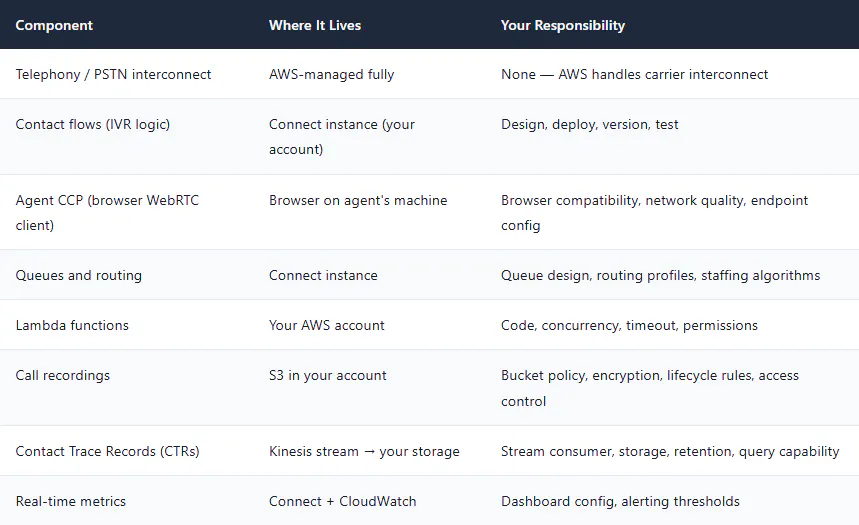
The practical implication: when something goes wrong in Connect, the root cause is almost always in one of the components you own — a Lambda timeout, a misconfigured queue, a routing profile with no agents, or an S3 bucket policy that blocks recording writes. AWS's telephony infrastructure failing is rare; your code and configuration failing is not.
2. Service Limits and the Concurrent Call Math
This is the section most architecture guides skip, and it is the section that causes the 9 AM Monday panic. Let me walk through the actual numbers.
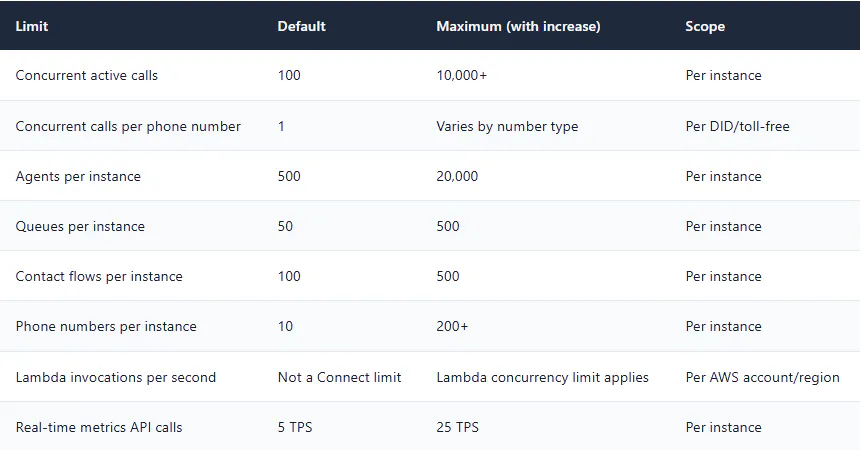
Default Service Limits (Per Instance)
Attention: The Default 100-Call Limit Will Kill You
Every new Connect instance has a default concurrent call limit of 100. This is a hard stop — the 101st call gets a busy signal. I have seen this bite teams who tested with 20 concurrent calls, declared success, and launched to production. Request limit increases before you go live, not after. AWS Support typically takes 2–5 business days to process capacity increases.
Calculating Your Actual Concurrency Requirement
The number "10,000 concurrent calls" is your peak target. But what does that mean for the service limits you need to request? Here is the calculation I use when sizing any Connect deployment:
# Concurrent call capacity formula
#
# Variables:
#   peak_calls_per_hour   = Max calls you expect in any 60-minute window
#   avg_handle_time_min   = Average time a call occupies a channel (IVR + queue + talk + wrap)
#   safety_margin         = Buffer above peak (recommend 1.3x minimum, 1.5x for HIPAA/GDPR)
#
# Formula:
#   concurrent_calls_needed = (peak_calls_per_hour / 60) × avg_handle_time_min × safety_margin
#
# Example: 10,000 concurrent call target
#   peak_calls_per_hour   = 50,000  (50k calls in the busiest hour)
#   avg_handle_time_min   = 8       (2min IVR + 3min queue + 3min talk = 8min)
#   safety_margin         = 1.5     (HIPAA compliance requires conservative headroom)
#
#   concurrent_needed = (50,000 / 60) × 8 × 1.5
#                     = 833 × 8 × 1.5
#                     = 10,000  ✓  matches our target
#
# What to request from AWS Support:
#   concurrent_active_calls  = 12,000  (your calculated need + 20% extra)
#   phone_numbers            = calculated based on peak CPS (calls per second)
#   agents                   = your actual agent headcount × 1.2

PEAK_CPH=50000
AVG_HANDLE_MIN=8
SAFETY=1.5

CONCURRENT=$(echo "scale=0; ($PEAK_CPH / 60) * $AVG_HANDLE_MIN * $SAFETY" | bc)
echo "Concurrent calls needed: $CONCURRENT"
echo "Request from AWS Support: $(echo "$CONCURRENT * 1.2" | bc | cut -d. -f1)"
The Phone Number Bottleneck Nobody Talks About
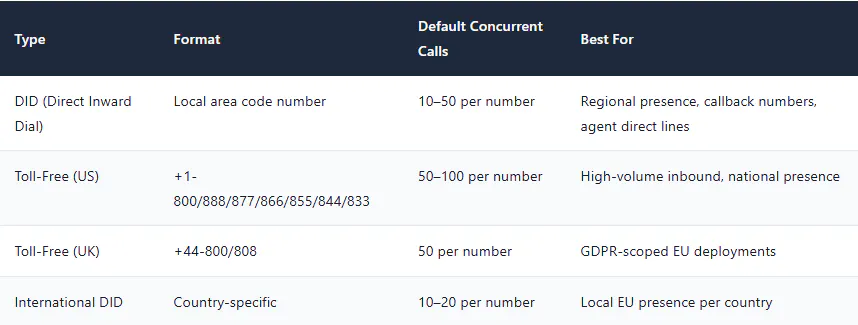
Here is something that is not in the AWS documentation prominently: each phone number has its own concurrent call limit. A single toll-free number in the US can typically handle up to 50 concurrent inbound calls by default, with increases available. If you route 10,000 concurrent calls through a single number, you need to request a capacity increase specifically for that number — and AWS may route you through carrier provisioning processes that take weeks, not days.
For a 10,000 concurrent call deployment, the phone number strategy is not a footnote — it is a critical path item. You typically need a pool of numbers with load distributed across them, or a high-capacity toll-free number with an explicitly provisioned carrier agreement.
Note: Request Limits Early — AWS Lead Times Are Real
For a 10,000 concurrent call deployment, plan to submit your service limit increase requests at least 4 weeks before go-live. Some increases (particularly high-capacity toll-free numbers and concurrent call limits above 5,000) require AWS to coordinate with carrier partners and may involve manual review. "We need this limit increased in 48 hours" is not a conversation you want to be having on the eve of your launch.
3. Instance Architecture — Single, Multi-Instance, or Multi-Region?
When you create an Amazon Connect instance, you are creating a logical boundary for your contact centre configuration — agents, queues, contact flows, phone numbers, and routing profiles all live within a single instance. The first architectural question for any serious deployment is whether you need one instance or more.
Option A — Single Instance
A single Connect instance handles all calls, all agents, all queues. Simple to manage, simple to monitor. Appropriate for most deployments up to ~3,000 concurrent calls if they are single-region and single-compliance-domain.
Where it breaks down: When you have HIPAA and GDPR requirements simultaneously — for example, a US healthcare company operating in Europe — a single instance creates compliance complexity. GDPR data residency requirements mean European callers' data (including call recordings and contact trace records) must not leave the EU. HIPAA requirements govern US healthcare data. A single Connect instance lives in one AWS region. You cannot satisfy both requirements with one instance.
Option B — Multi-Instance (Same Region)
Multiple Connect instances in the same region, each handling a specific workload segment — for example, one instance for US/HIPAA scope and one for EU/GDPR scope. Allows independent scaling, independent compliance controls, and independent agent pools.
Trade-off: Doubles the operational overhead. Contact flow changes must be deployed to both instances. Agents cannot span instances without separate logins. Lambda functions can be shared across instances (they just need the correct resource-based policy permissions from each instance).
Option C — Multi-Region (Active/Passive DR)
Two Connect instances in different AWS regions. One is primary, one is standby. Phone numbers point to the primary instance. In a regional failure, phone numbers are re-pointed to the standby instance via Route 53 failover.
The hard truth about Connect DR: Connect does not offer native cross-region replication of contact flows, agents, queues, or configuration. If your primary instance is in us-east-1 and your DR instance is in us-west-2, you are responsible for keeping the configuration in sync. The only reliable way to do this is to have both instances managed by the same Terraform codebase — which is exactly what Part 2 of this series covers.
Option D — Multi-Region (Active/Active)
Two or more Connect instances in different regions, both actively handling calls simultaneously. Route 53 latency-based routing or weighted routing distributes callers to the nearest or least-loaded instance.
This is the architecture for a genuine 10,000 concurrent call deployment with HIPAA and GDPR compliance. Here is why:
- EU callers route to the EU instance — GDPR data residency is satisfied architecturally, not just contractually
- US callers route to the US instance — HIPAA controls apply to that instance only, reducing audit scope
- No single instance needs to carry the full 10,000 concurrent call load — the limit increase request is more tractable
- Regional AWS failures affect only half your capacity rather than all of it
Decision: Our Target Architecture
For this series, we are building an active/active multi-region deployment with two Connect instances: one in us-east-1 (HIPAA-scoped) and one in eu-west-1 (GDPR-scoped). Each instance is sized for 6,000 concurrent calls with 20% overhead, giving us genuine 10,000 call capacity with regional DR built in. All configuration is managed as Terraform code in a single repository.
4. Reference Architecture — The Full Production Topology
Below is the complete architecture for the 10,000 concurrent call deployment we are building across this series. Every component in this diagram will be built in subsequent parts.
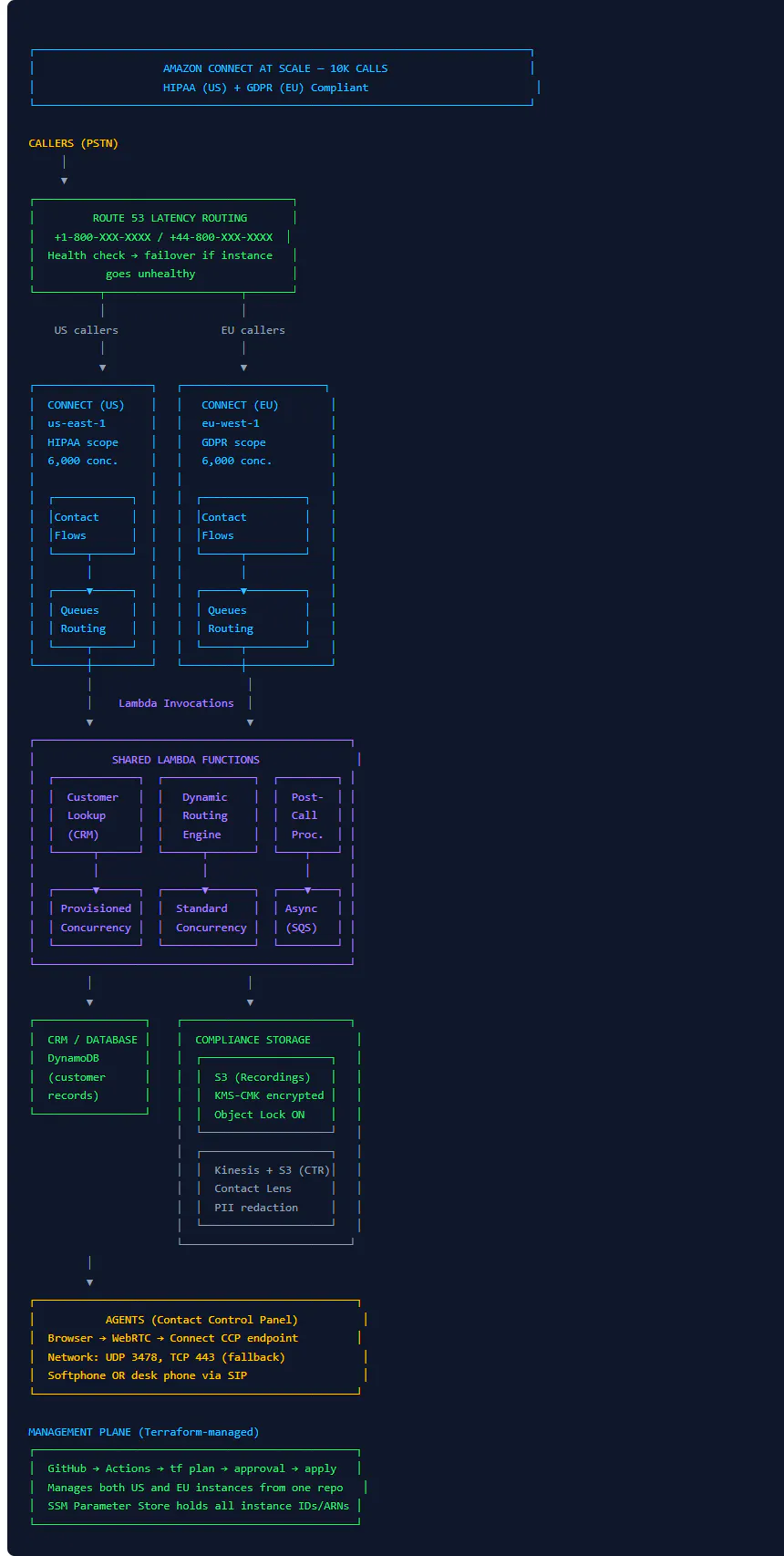
There are a few things in this diagram worth calling out explicitly before we move forward.
The Lambda functions are shared across both instances. A single set of Lambda functions in each region handles invocations from the Connect instance in that region. There is no need to duplicate Lambda code per instance — but the Connect instance ARN must be added to each Lambda's resource-based policy. We cover this in Part 3.
KMS Customer Managed Keys are per-region, per-compliance-domain. The US instance uses a CMK in us-east-1. The EU instance uses a separate CMK in eu-west-1. Key material never crosses regions. Part 4 covers the full compliance storage architecture.
The management plane is a single GitHub repository. Both instances are managed as Terraform code in one repo, with environment-specific tfvars files for US and EU. A single pipeline deploy touches both. Part 2 covers this CI/CD pipeline in full.
5. CCP Architecture — What WebRTC Means for Your Network
The Contact Control Panel (CCP) is the browser application your agents use to answer calls. It looks simple — a softphone UI embedded in a browser tab. But understanding what is happening under the hood is critical for capacity planning, especially for a 10,000 call deployment where you have potentially thousands of agents connected simultaneously.
How a Call Actually Connects to an Agent
When an inbound call arrives and Connect routes it to an agent, here is the exact sequence:
- Connect's telephony layer receives the call on AWS's carrier infrastructure
- Contact flow executes — Lambda functions run, queue logic runs, routing decision is made
- Connect signals the agent's CCP via its websocket connection (persistent connection the CCP maintains to Connect's API)
- The CCP negotiates a WebRTC peer connection directly between the agent's browser and Connect's media servers
- Audio flows over UDP via SRTP (encrypted) between the agent's machine and AWS
The practical implications of step 4 and 5 are significant and often overlooked:
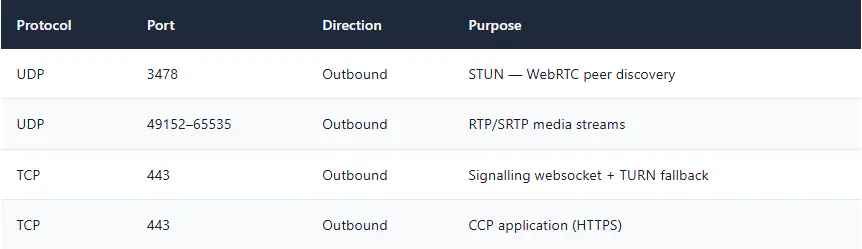
Network Requirements for CCP at Scale
Warning: The Firewall Problem That Causes Silent Audio Failures
Corporate network firewalls that block outbound UDP will force WebRTC to fall back to TURN over TCP/443. The call connects but audio quality degrades significantly — latency increases and packet loss becomes audible. For a 1,000-agent deployment, this manifests as "calls sound bad" tickets flooding your helpdesk. The fix is straightforward: allow outbound UDP 3478 and the ephemeral port range from agent workstations to AWS's IP ranges. But diagnosing it takes hours if you don't know what to look for. Check this before you go live.
CCP Bandwidth and CPU Per Agent
Each active CCP session consumes approximately:
- ~100 Kbps bandwidth per active call (OPUS codec, 16kHz sampling)
- 5–15% CPU on the agent's machine (WebRTC processing)
- One persistent websocket connection per CCP instance (even when not on a call)
For a deployment with 2,000 concurrent agents, that is 200 Mbps of aggregate voice traffic leaving your network. If those agents are behind a shared corporate internet connection, this number matters to your network team well before it matters to Connect.
6. Phone Number Strategy — DID, Toll-Free, and the Porting Timeline
Phone numbers in Amazon Connect are claimed (new numbers from AWS's inventory) or ported (your existing numbers transferred to Connect). Both have implications for a large-scale deployment that are worth understanding before you start building.
Number Types and Their Limits
Terraform: Claiming a Phone Number
Phone numbers are claimed and associated with contact flows entirely via Terraform:
##############################################################
# Phone Number — US Toll-Free (HIPAA instance)
##############################################################
resource "aws_connect_phone_number" "us_tollfree_main" {
  target_arn   = aws_connect_instance.us_hipaa.arn
  country_code = "US"
  type         = "TOLL_FREE"
  description  = "Main inbound toll-free — US HIPAA scope"

  tags = {
    Environment = "production"
    Compliance  = "HIPAA"
    ManagedBy   = "Terraform"
  }
}

# Associate the number with a contact flow
resource "aws_connect_phone_number_contact_flow_association" "us_main" {
  instance_id     = aws_connect_instance.us_hipaa.id
  phone_number_id = aws_connect_phone_number.us_tollfree_main.id
  contact_flow_id = aws_connect_contact_flow.main_inbound.id
}

##############################################################
# Phone Number — EU (GDPR instance)
##############################################################
resource "aws_connect_phone_number" "eu_tollfree_main" {
  target_arn   = aws_connect_instance.eu_gdpr.arn
  country_code = "GB"
  type         = "TOLL_FREE"
  description  = "Main inbound toll-free — EU GDPR scope"

  tags = {
    Environment = "production"
    Compliance  = "GDPR"
    ManagedBy   = "Terraform"
  }
}

# Output the claimed numbers — needed for Route 53 and carrier config
output "us_main_phone_number" {
  value     = aws_connect_phone_number.us_tollfree_main.phone_number
  sensitive = false
}

output "eu_main_phone_number" {
  value     = aws_connect_phone_number.eu_tollfree_main.phone_number
  sensitive = false
}
Point to Note: Number Porting Timeline Reality Check
If you are porting existing numbers to Connect, plan for 4–8 weeks in the US and 6–12 weeks in the EU. Carrier porting is not an AWS process — it involves your current carrier, AWS's carrier partner, and regulatory coordination. Build this into your project timeline as a hard dependency. I have seen product launches delayed three weeks because someone assumed porting would take "a few days."
7. Queue Design for 10,000 Concurrent Calls
A queue in Amazon Connect is not a buffer that holds callers temporarily while agents become available. It is the core routing mechanism — it defines which agents can answer which calls, in what priority order, with what SLA targets. Queue design at scale is one of the decisions that most directly affects both customer experience and operational efficiency.
Queue Architecture for a Multi-Compliance Deployment
##############################################################
# Queue Configuration — US HIPAA Instance
# Pattern: one queue per customer segment × priority tier
##############################################################

locals {
  us_queues = {
    "platinum-support" = {
      description        = "Tier 1 — Platinum customers, SLA 30s"
      hours_of_operation = aws_connect_hours_of_operation.us_247.id
      max_contacts       = 100   # Max callers waiting — beyond this, overflow
    }
    "standard-support" = {
      description        = "Tier 2 — Standard customers, SLA 120s"
      hours_of_operation = aws_connect_hours_of_operation.us_business_hours.id
      max_contacts       = 500
    }
    "callback-queue" = {
      description        = "Virtual queue for callback requests"
      hours_of_operation = aws_connect_hours_of_operation.us_247.id
      max_contacts       = 1000
    }
    "overflow" = {
      description        = "Overflow — max capacity reached in primary queues"
      hours_of_operation = aws_connect_hours_of_operation.us_247.id
      max_contacts       = 5000
    }
  }
}

resource "aws_connect_queue" "us_queues" {
  for_each = local.us_queues

  instance_id             = aws_connect_instance.us_hipaa.id
  name                    = each.key
  description             = each.value.description
  hours_of_operation_id   = each.value.hours_of_operation
  max_contacts            = each.value.max_contacts

  # Outbound caller ID for callbacks
  outbound_caller_config {
    outbound_caller_id_name   = "Support Team"
    outbound_caller_id_number_id = aws_connect_phone_number.us_tollfree_main.id
  }

  tags = {
    Environment = "production"
    Compliance  = "HIPAA"
    ManagedBy   = "Terraform"
  }
}

##############################################################
# Routing Profile — maps agent skills to queues with priority
##############################################################
resource "aws_connect_routing_profile" "us_platinum_agents" {
  instance_id               = aws_connect_instance.us_hipaa.id
  name                      = "platinum-support-agents"
  description               = "Agents who handle platinum + standard overflow"
  default_outbound_queue_id = aws_connect_queue.us_queues["standard-support"].id

  # Queue priorities: lower number = answered first
  queue_configs {
    channel  = "VOICE"
    delay    = 0      # Answer immediately — no delay before agent is eligible
    priority = 1
    queue_id = aws_connect_queue.us_queues["platinum-support"].id
  }

  queue_configs {
    channel  = "VOICE"
    delay    = 120    # Only pull from standard queue if platinum is quiet for 2min
    priority = 2
    queue_id = aws_connect_queue.us_queues["standard-support"].id
  }

  media_concurrencies {
    channel     = "VOICE"
    concurrency = 1  # Voice: always 1 at a time per agent
  }
}

resource "aws_connect_routing_profile" "us_standard_agents" {
  instance_id               = aws_connect_instance.us_hipaa.id
  name                      = "standard-support-agents"
  description               = "Standard tier agents"
  default_outbound_queue_id = aws_connect_queue.us_queues["standard-support"].id

  queue_configs {
    channel  = "VOICE"
    delay    = 0
    priority = 1
    queue_id = aws_connect_queue.us_queues["standard-support"].id
  }

  media_concurrencies {
    channel     = "VOICE"
    concurrency = 1
  }
}
Note: The max_contacts Parameter Is Your Overflow Valve
Setting max_contacts on a queue defines the maximum number of callers that can be waiting in that queue simultaneously. When the limit is hit, the contact flow receives an error condition that you can handle — typically routing to an overflow queue, offering a callback, or playing a capacity message. Without this, callers queue indefinitely. For a 10,000 call deployment, an unbounded queue is a reliability risk: if your agent staffing model is wrong and wait times balloon, the queue fills with thousands of callers and abandonment rates spike. Set explicit limits and handle the overflow condition deliberately.
8. Multi-Region DR — Active/Active with Route 53
For a deployment at this scale, "DR" is not a separate document you write and never test. It is an architectural property of the system that either exists or doesn't. The active/active approach we are taking means that both instances carry live production traffic at all times — which means DR is tested continuously, not quarterly.
Route 53 Health Checks for Connect
Connect does not expose a health endpoint you can directly check — you cannot ping an instance and get a health status. What you can do is check the reachability of the Connect instance's API endpoint and combine it with a Lambda-based health check that validates actual call processing capability:
##############################################################
# Route 53 Health Checks for Connect Instances
##############################################################

# Health check Lambda — tests Connect instance reachability
resource "aws_lambda_function" "connect_health_check_us" {
  provider      = aws.us_east_1
  function_name = "connect-health-check-us"
  runtime       = "python3.12"
  handler       = "health_check.handler"
  role          = aws_iam_role.health_check_lambda.arn
  filename      = "${path.module}/../lambda/health-check.zip"
  timeout       = 10

  environment {
    variables = {
      CONNECT_INSTANCE_ID = aws_connect_instance.us_hipaa.id
      REGION              = "us-east-1"
    }
  }
}

# CloudWatch alarm based on health check Lambda failures
resource "aws_cloudwatch_metric_alarm" "connect_us_health" {
  provider            = aws.us_east_1
  alarm_name          = "connect-us-instance-health"
  comparison_operator = "GreaterThanOrEqualToThreshold"
  evaluation_periods  = 2
  metric_name         = "Errors"
  namespace           = "AWS/Lambda"
  period              = 60
  statistic           = "Sum"
  threshold           = 3
  alarm_description   = "Connect US instance failing health checks"

  dimensions = {
    FunctionName = aws_lambda_function.connect_health_check_us.function_name
  }

  alarm_actions = [aws_sns_topic.pagerduty_critical.arn]
}

##############################################################
# Route 53 — Latency-based routing with failover
##############################################################
resource "aws_route53_record" "connect_us" {
  zone_id = aws_route53_zone.contact_centre.zone_id
  name    = "calls.yourcompany.com"
  type    = "CNAME"

  latency_routing_policy {
    region = "us-east-1"
  }

  set_identifier = "us-hipaa"
  records        = [aws_connect_phone_number.us_tollfree_main.phone_number]
  ttl            = 60   # Low TTL — fast failover if instance goes unhealthy
}

resource "aws_route53_record" "connect_eu" {
  zone_id = aws_route53_zone.contact_centre.zone_id
  name    = "calls.yourcompany.com"
  type    = "CNAME"

  latency_routing_policy {
    region = "eu-west-1"
  }

  set_identifier = "eu-gdpr"
  records        = [aws_connect_phone_number.eu_tollfree_main.phone_number]
  ttl            = 60
}
Warning: Route 53 TTL and In-Flight Calls
When a Route 53 failover triggers, callers who are mid-call are not affected — their WebRTC session is established and remains connected. New callers are affected as DNS propagates. With a 60-second TTL, most DNS resolvers refresh within 1–2 minutes of a failover event. Calls that arrive during that window may still reach the unhealthy instance. This is why the Connect instance itself needs its own graceful degradation logic — contact flows should handle Lambda timeouts and queue failures gracefully rather than dropping calls.
9. Provisioning Connect Instances with Terraform
The Connect Terraform provider is mature enough for production use, with a few important caveats. The instance itself, storage configuration, and logging can all be managed as code. Here is the full instance bootstrap for both the US and EU instances:
##############################################################
# File: connect/instances.tf
# Creates both Connect instances with proper storage config
##############################################################

terraform {
  required_providers {
    aws = {
      source  = "hashicorp/aws"
      version = "~> 5.40"
    }
  }
}

# ── US Instance (HIPAA) ──────────────────────────────────────
resource "aws_connect_instance" "us_hipaa" {
  provider = aws.us_east_1

  identity_management_type = "CONNECT_MANAGED"   # Or SAML for SSO
  inbound_calls_enabled    = true
  outbound_calls_enabled   = true

  # Instance alias becomes part of the Connect URL:
  # https://.my.connect.aws/
  instance_alias = "${var.company_slug}-us-prod"

  tags = {
    Environment = "production"
    Compliance  = "HIPAA"
    Region      = "us-east-1"
    ManagedBy   = "Terraform"
    Owner       = "platform-team"
  }
}

# ── EU Instance (GDPR) ──────────────────────────────────────
resource "aws_connect_instance" "eu_gdpr" {
  provider = aws.eu_west_1

  identity_management_type = "CONNECT_MANAGED"
  inbound_calls_enabled    = true
  outbound_calls_enabled   = true
  instance_alias           = "${var.company_slug}-eu-prod"

  tags = {
    Environment = "production"
    Compliance  = "GDPR"
    Region      = "eu-west-1"
    ManagedBy   = "Terraform"
  }
}

##############################################################
# Storage Configuration — Call Recordings + CTR
# KMS CMKs are created in Part 4 (compliance module)
# Here we reference them by ARN via data source
##############################################################

# US — HIPAA encrypted storage
resource "aws_connect_instance_storage_config" "us_recordings" {
  provider      = aws.us_east_1
  instance_id   = aws_connect_instance.us_hipaa.id
  resource_type = "CALL_RECORDINGS"

  storage_config {
    s3_config {
      bucket_name   = aws_s3_bucket.us_recordings.id
      bucket_prefix = "recordings"

      encryption_config {
        encryption_type = "KMS"
        key_id          = data.aws_kms_key.us_hipaa_cmk.arn
      }
    }
    storage_type = "S3"
  }
}

resource "aws_connect_instance_storage_config" "us_ctr" {
  provider      = aws.us_east_1
  instance_id   = aws_connect_instance.us_hipaa.id
  resource_type = "CONTACT_TRACE_RECORDS"

  storage_config {
    kinesis_stream_config {
      stream_arn = aws_kinesis_stream.us_ctr_stream.arn
    }
    storage_type = "KINESIS_STREAM"
  }
}

# EU — GDPR encrypted storage
resource "aws_connect_instance_storage_config" "eu_recordings" {
  provider      = aws.eu_west_1
  instance_id   = aws_connect_instance.eu_gdpr.id
  resource_type = "CALL_RECORDINGS"

  storage_config {
    s3_config {
      bucket_name   = aws_s3_bucket.eu_recordings.id
      bucket_prefix = "recordings"

      encryption_config {
        encryption_type = "KMS"
        key_id          = data.aws_kms_key.eu_gdpr_cmk.arn
      }
    }
    storage_type = "S3"
  }
}

##############################################################
# Outputs — consumed by Lambda module, compliance module, CI/CD
##############################################################
output "us_instance_id"  { value = aws_connect_instance.us_hipaa.id }
output "us_instance_arn" { value = aws_connect_instance.us_hipaa.arn }
output "eu_instance_id"  { value = aws_connect_instance.eu_gdpr.id }
output "eu_instance_arn" { value = aws_connect_instance.eu_gdpr.arn }

# Store in SSM — Lambda functions and contact flows reference these at runtime
resource "aws_ssm_parameter" "us_instance_id" {
  provider = aws.us_east_1
  name     = "/connect/us/instance-id"
  type     = "String"
  value    = aws_connect_instance.us_hipaa.id
  tags     = { ManagedBy = "Terraform" }
}

resource "aws_ssm_parameter" "eu_instance_id" {
  provider = aws.eu_west_1
  name     = "/connect/eu/instance-id"
  type     = "String"
  value    = aws_connect_instance.eu_gdpr.id
  tags     = { ManagedBy = "Terraform" }
}
10. Capacity Planning Checklist — Before You Submit a Single Ticket
This is the checklist I run through at the start of every Connect engagement. Complete it before you file a single service limit increase or provision a single resource. The answers determine your architecture.
Business Requirements
- Peak concurrent calls defined and documented (not "we think around X" — actual number)
- Peak calls per hour figure confirmed with the business (marketing campaigns, seasonal spikes)
- Average handle time measured from existing system or estimated with signed-off assumption
- Agent headcount per shift defined — maximum concurrent agents
- Operating hours per region documented — 24/7 or business hours only?
- Callback requirement defined — do callers have the option to request a callback?
- Compliance scope confirmed — HIPAA only, GDPR only, or both?
- Geographic markets confirmed — which countries must be served from which region?
AWS Service Limit Increase Requests
- Concurrent active calls limit increase submitted per instance
- Phone number capacity increase submitted for each number
- Lambda concurrency increase submitted if shared with other workloads
- Kinesis shard count calculated for CTR stream volume
- CloudWatch metrics API rate increase requested if building real-time dashboards
- Lead time for increases confirmed with AWS Support (do this in the first week)
Network and Endpoint Readiness
- Outbound UDP 3478 allowed from agent workstations to AWS IP ranges
- Ephemeral UDP port range (49152–65535) allowed for RTP media
- Connect domains allow listed in corporate web proxy and DNS
- Bandwidth calculation completed for peak concurrent agent count
- Agent workstation browser compatibility verified (Chrome 88+ recommended)
- Headset and audio device standards defined and tested with CCP
Compliance Prerequisites
- AWS BAA signed (required before handling PHI in Connect)
- KMS CMK design approved by security team
- S3 recording bucket region confirmed and matches instance region
- Data retention periods defined and approved by legal/compliance
- Right-to-erasure procedure designed (covered in Part 4)
- Contact Lens PII redaction requirements defined
Operational Readiness
- Terraform repository structure agreed
- GitHub Actions CI/CD pipeline designed (covered in Part 2)
- On-call rotation defined for Connect platform
- Go-live runbook drafted (covered in Part 5)
- Monitoring and alerting strategy agreed
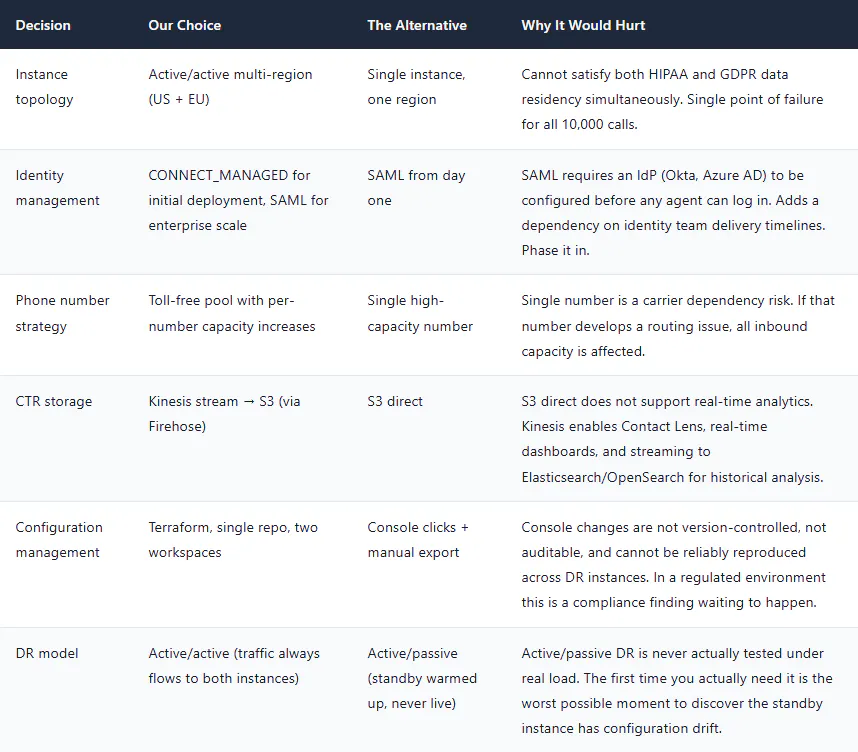
11. Architecture Trade-offs — The Decisions That Matter
What's Next in This Series
We have covered the architectural decisions and capacity mathematics that underpin a 10,000 concurrent call deployment. You should now have a clear picture of how many Connect instances you need, where they should live, what service limits to request, and why active/active multi-region is the right model for a HIPAA and GDPR compliant deployment.
Part 2 gets hands-on with Terraform. We will build the complete IaC structure for both Connect instances, write the CI/CD pipeline in GitHub Actions, design the contact flow module system that keeps flows maintainable at scale, and build the 60-second rollback procedure you will be very glad to have on the day a bad flow deployment reaches production.
If you are running through this series to build a specific deployment — drop your questions in the comments. The specifics of your compliance requirements, agent count, or call volume may shift the architecture in ways worth discussing before you start building.
📞 Series: Amazon Connect at Scale
✅ Part 1: Architecture & Capacity Planning (you are here)
➡️ Part 2: Contact Flows as Code — Terraform & CI/CD Pipeline
➡️ Part 3: Lambda Integration Patterns
➡️ Part 4: GDPR & HIPAA Compliance
➡️ Part 5: Troubleshooting & Observability