Setting Up AWS Control Tower, Organizations & SCPs with Terraform
Series: AWS Organizations: From Zero to Enterprise — Part 2
> * Part 1: Why Every Company Needs AWS Organizations — and How to Plan It Right
> * Part 2: Setting Up AWS Control Tower, Organizations & SCPs with Terraform (This one)
>  Part 3: SCPs, Guardrails & Day-2 Operations (coming soon)*
Architecture Overview
Before writing a single line of Terraform, it is worth being explicit about what we are building and the relationship between the services involved. AWS Organizations is the underlying service that groups accounts and enables policy enforcement. Control Tower sits on top of it as a managed orchestration layer — it creates the initial OU structure, deploys baseline guardrails, and provides the Account Factory for provisioning new accounts. Terraform is the tool we use to express all of this as code, using the AWS provider for Organization-level resources and the Control Tower Terraform module for the landing zone itself.
The architecture we are deploying follows the five-OU reference model from Part 1, with specific AWS services mapped to each layer. Below is the complete deployment target — drawn with AWS native service icons — that we will build in this article.
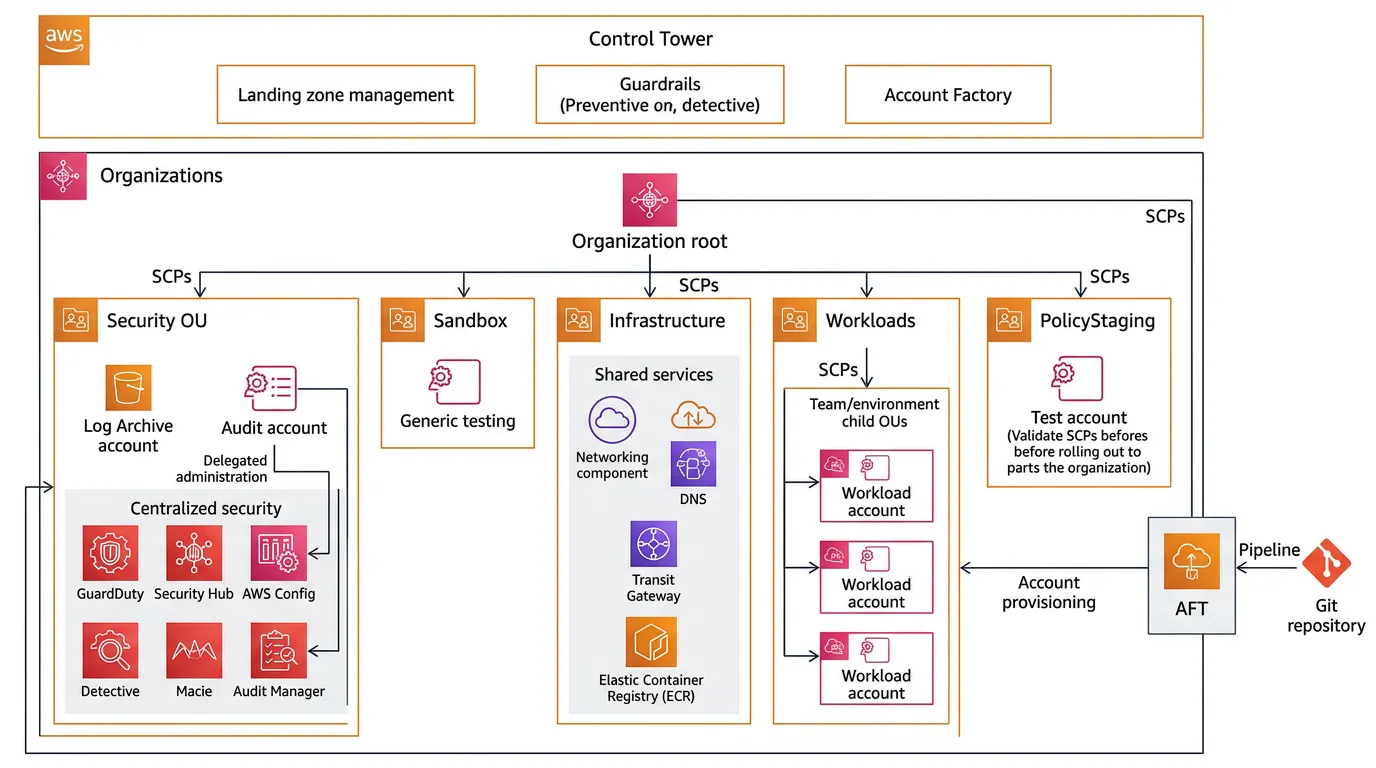
Fig 1. Complete AWS Organizations architecture showing all OUs, member accounts, centralized security services with delegated administration, SCP evaluation order, and AFT account vending flow. AWS native service icons used throughout.
Prerequisites & Bootstrap
Before any Terraform runs, there is a small set of manual steps that must be completed. These are one-time bootstraps — everything after them is automated.
What you need going in: An AWS account with no prior Organization configured (your future management account), an IAM user or role with `AdministratorAccess` in that account, AWS CLI v2 configured with those credentials, Terraform 1.5+, and a Git repository where your infrastructure code will live.
Management Account — Do This First
Enable MFA on the management account root user before doing anything else. Go to IAM → root user → enable MFA. Store the MFA device details in a secure vault (1Password, HashiCorp Vault, AWS Secrets Manager in a separate break-glass account). This is not optional.
Bootstrap Checklist
- Root MFA enabled on the management account with a hardware token or virtual MFA in a vault
- Billing alerts enabled in management account — Billing → Billing Preferences → Receive Billing Alerts
- S3 bucket created for Terraform remote state (versioning + encryption enabled, public access blocked)
- Terraform workspace initialized locally with your management account credentials
01. Enable AWS Control Tower
Control Tower must be enabled through the AWS Console once — manually — before Terraform can manage it. This is a deliberate design: Control Tower performs a multi-step setup process (creating service-linked roles, enabling trusted access for multiple services, creating the initial Log Archive and Audit accounts) that cannot be safely replicated via API calls alone.
"Think of Control Tower's initial setup as laying the foundation slab.
You do it once with the right tools, then Terraform builds everything on top."
Console Setup Steps
1. In the management account, navigate to AWS Control Tower → Set up landing zone
2. Choose your Home Region (the primary region — typically `us-east-1` or your nearest geography). This cannot be changed later without full reset.
3. Choose additional governed regions if you need workloads in multiple regions. Only add regions you actually intend to use — each region adds guardrail overhead.
4. Review the foundational OU names. Accept the defaults (`Security` and `Sandbox`) — we will build additional OUs with Terraform momentarily.
5. Accept the email addresses for Log Archive and Audit accounts. Use distribution lists, not personal emails.
6. Click Set up landing zone. This takes approximately 45–60 minutes to complete.
Do Not Interrupt This Process
Control Tower landing zone setup creates resources across multiple accounts and services in a specific order. Navigating away, closing the browser, or letting the session time-out mid-setup can leave the organization in a partially configured state that requires AWS Support to resolve. Start this process when you have an uninterrupted hour.
When the setup completes, you will have: an Organization with a Root OU, two Control Tower managed OUs (`Security` and `Sandbox`), two member accounts (Log Archive and Audit), and a baseline set of mandatory guardrails (SCPs) already applied. Now Terraform takes over.
02. Terraform the Organization & OU Hierarchy
With Control Tower deployed, we use Terraform to import the existing Organization into state and extend the OU structure. The project layout below is the recommended structure for managing an AWS Organization — keep organization-level resources separate from workload-level resources.
infra/
├── org/ # THIS module — org-level only
│ ├── main.tf # Organization, OUs, SCP attachments
│ ├── scps.tf # All SCP policy documents
│ ├── variables.tf
│ ├── outputs.tf # OU IDs, org ID — consumed by AFT
│ ├── backend.tf
│ └── terraform.tfvars # gitignored — sensitive IDs
├── aft/ # Account Factory for Terraform
│ ├── main.tf
│ └── variables.tf
└── accounts/ # Per-account request files (AFT)
├── network-prod.tf
├── team-a-prod.tf
└── team-a-dev.tf
Provider & Backend Configuration
org/backend.tf
# Remote state — must be in management account
terraform {
  required_version = ">= 1.5.0"

  required_providers {
    aws = {
      source  = "hashicorp/aws"
      version = "~> 5.40"
    }
  }

  backend "s3" {
    bucket         = "YOUR-COMPANY-tfstate-mgmt"
    key            = "org/terraform.tfstate"
    region         = "us-east-1"
    encrypt        = true
    dynamodb_table = "terraform-lock"

    # Use assume_role — never run as root or AdministratorAccess
    role_arn = "arn:aws:iam::MGMT-ACCOUNT-ID:role/TerraformOrgRole"
  }
}

provider "aws" {
  region = "us-east-1"

  assume_role {
    role_arn     = "arn:aws:iam::${var.mgmt_account_id}:role/TerraformOrgRole"
    session_name = "TerraformOrg"
  }

  default_tags {
    tags = {
      ManagedBy   = "Terraform"
      Repository  = "infra/org"
      Environment = "management"
    }
  }
}
Import the Existing Organization
Control Tower has already created the AWS Organization. We import it into Terraform state rather than creating a new one — terraform import attaches an existing resource to a resource block without destroying and recreating it.
org/main.tf
##############################################################
# DATA: read the existing organization (created by Control Tower)
##############################################################
data "aws_organizations_organization" "this" {}

##############################################################
# ORGANIZATION — imported, not created
# Run: terraform import aws_organizations_organization.this \
#        $(aws organizations describe-organization \
#           --query 'Organization.Id' --output text)
##############################################################
resource "aws_organizations_organization" "this" {
  aws_service_access_principals = [
    "cloudtrail.amazonaws.com",
    "config.amazonaws.com",
    "config-multiaccountsetup.amazonaws.com",
    "guardduty.amazonaws.com",
    "securityhub.amazonaws.com",
    "auditmanager.amazonaws.com",
    "detective.amazonaws.com",
    "macie.amazonaws.com",
    "sso.amazonaws.com",
    "servicecatalog.amazonaws.com",
    "account.amazonaws.com",
    "controltower.amazonaws.com",
    "budgets.amazonaws.com",
    "cost-optimization-hub.bcm.amazonaws.com",
  ]

  enabled_policy_types = [
    "SERVICE_CONTROL_POLICY",
    "TAG_POLICY",           # Enforce tagging standards
    "BACKUP_POLICY",         # Centralised backup policies
  ]

  feature_set = "ALL"  # Required for SCPs — never use "CONSOLIDATED_BILLING"
}
Why enable TAG_POLICY and BACKUP_POLICY now? Enabling policy types on an existing organization requires no downtime but cannot be undone without impact. Tag Policies let you define allowed tag keys and values across the org — critical for cost allocation accuracy. Backup Policies let you define centralized AWS Backup plans. Enabling both now costs nothing and avoids a separate change window later.
Building the OU Hierarchy
Control Tower created the Security and Sandbox OUs. We import those, then create the Infrastructure, Workloads, and PolicyStaging OUs.
org/main.tf
##############################################################
# ROOT — read from data source; cannot be created
##############################################################
data "aws_organizations_organizational_units" "root" {
  parent_id = data.aws_organizations_organization.this.roots[0].id
}

locals {
  root_id = data.aws_organizations_organization.this.roots[0].id
}

##############################################################
# SECURITY OU — created by Control Tower; import it
# terraform import aws_organizations_organizational_unit.security \
#   SECURITY-OU-ID
##############################################################
resource "aws_organizations_organizational_unit" "security" {
  name      = "Security"
  parent_id = local.root_id

  tags = {
    Purpose  = "Centralized security tooling and immutable audit logs"
    Tier     = "security"
    Managed  = "ControlTower+Terraform"
  }
}

# SANDBOX OU — also created by Control Tower; import similarly
# terraform import aws_organizations_organizational_unit.sandbox \
#   SANDBOX-OU-ID
resource "aws_organizations_organizational_unit" "sandbox" {
  name      = "Sandbox"
  parent_id = local.root_id

  tags = {
    Purpose = "Developer experiments with cost guardrails"
    Tier    = "sandbox"
  }
}

##############################################################
# INFRASTRUCTURE OU — Terraform created
##############################################################
resource "aws_organizations_organizational_unit" "infrastructure" {
  name      = "Infrastructure"
  parent_id = local.root_id

  tags = {
    Purpose = "Shared network, DNS, Transit Gateway, ECR, shared services"
    Tier    = "infrastructure"
  }
}

##############################################################
# WORKLOADS OU — parent for all team/env sub-OUs
##############################################################
resource "aws_organizations_organizational_unit" "workloads" {
  name      = "Workloads"
  parent_id = local.root_id

  tags = {
    Purpose = "All application workload accounts per team and environment"
    Tier    = "workloads"
  }
}

##############################################################
# WORKLOADS CHILD OUs — one per team (prod/staging/dev)
# Use for_each to keep this DRY as you add teams
##############################################################
variable "workload_teams" {
  description = "Map of team slugs to their metadata"
  type = map(object({
    description = string
    cost_center = string
  }))
  default = {
    "team-platform" = { description = "Platform engineering", cost_center = "CC-001" }
    "team-payments" = { description = "Payments service",    cost_center = "CC-002" }
    "team-identity" = { description = "Identity service",    cost_center = "CC-003" }
  }
}

resource "aws_organizations_organizational_unit" "team_ous" {
  for_each = var.workload_teams

  name      = each.key
  parent_id = resource.aws_organizations_organizational_unit.workloads.id

  tags = {
    Team        = each.key
    Description = each.value.description
    CostCenter  = each.value.cost_center
  }
}

##############################################################
# POLICY STAGING OU — test SCPs here before root rollout
##############################################################
resource "aws_organizations_organizational_unit" "policy_staging" {
  name      = "PolicyStaging"
  parent_id = local.root_id

  tags = {
    Purpose = "SCP validation before production rollout"
    Tier    = "policy-staging"
  }
}
03. Service Control Policies
SCPs are the most powerful governance tool in AWS Organizations. They define the maximum permissions available in any account within their scope — regardless of what IAM policies grant. A useful mental model for non-technical stakeholders: think of SCPs as the locks on the doors. IAM policies decide who has a key. SCPs decide which doors can ever be unlocked at all.
We use a layered SCP strategy: a small number of root-level SCPs that apply to every account, plus OU-level SCPs that tighten restrictions for specific tiers. The structure in Terraform follows a consistent pattern: policy document → policy resource → policy attachment.
SCP 1 — Deny Unapproved AWS Regions
This is the most impactful SCP you can deploy. It prevents any resource from being created in regions outside your approved list — eliminating an entire class of data sovereignty violations, compliance findings, and cost leakage from accidental deployments.
org/scps.tf
##############################################################
# SCP: Deny operations in unapproved regions
# Attachment: Root OU (applies to ALL accounts)
#
# IMPORTANT: Global services (IAM, STS, Route53, CloudFront,
# Support, TrustedAdvisor) must be excluded — they have no
# concept of a region and will break if you deny them.
##############################################################
data "aws_iam_policy_document" "deny_unapproved_regions" {
  statement {
    sid    = "DenyUnapprovedRegions"
    effect = "Deny"

    not_actions = [
      "iam:*",
      "sts:*",
      "organizations:*",
      "account:*",
      "cloudfront:*",
      "route53:*",
      "route53domains:*",
      "waf:*",
      "support:*",
      "trustedadvisor:*",
      "health:*",
      "ce:*",               # Cost Explorer — global
      "budgets:*",
      "cur:*",              # Cost and Usage Reports
      "savingsplans:*",
      "controltower:*",
    ]

    resources = ["*"]

    condition {
      test     = "StringNotEquals"
      variable = "aws:RequestedRegion"
      values   = var.approved_regions
    }
  }
}

variable "approved_regions" {
  description = "List of AWS regions permitted for workload deployment"
  type        = list(string)
  default     = ["us-east-1", "us-west-2", "eu-west-1", "ap-southeast-1"]
}

resource "aws_organizations_policy" "deny_unapproved_regions" {
  name        = "DenyUnapprovedRegions"
  description = "Prevent resource creation outside approved AWS regions"
  content     = data.aws_iam_policy_document.deny_unapproved_regions.json
  type        = "SERVICE_CONTROL_POLICY"

  tags = { Scope = "root", Category = "data-sovereignty" }
}

resource "aws_organizations_policy_attachment" "deny_regions_root" {
  policy_id = resource.aws_organizations_policy.deny_unapproved_regions.id
  target_id = local.root_id
}
SCP 2 — Require MFA for Console Actions
org/scps.tf
# Deny any human action that did not authenticate with MFA.
# Excludes assumed-role sessions (which can't have MFA context
# in the same way) — this targets console logins by IAM users.
data "aws_iam_policy_document" "require_mfa" {
  statement {
    sid    = "DenyWithoutMFA"
    effect = "Deny"

    not_actions = [
      "iam:CreateVirtualMFADevice",
      "iam:EnableMFADevice",
      "iam:GetUser",
      "iam:ListMFADevices",
      "iam:ListVirtualMFADevices",
      "iam:ResyncMFADevice",
      "sts:GetSessionToken",
    ]

    resources = ["*"]

    condition {
      test     = "BoolIfExists"
      variable = "aws:MultiFactorAuthPresent"
      values   = ["false"]
    }

    condition {
      test     = "BoolIfExists"
      variable = "aws:ViaAWSService"
      values   = ["false"]
    }
  }
}

resource "aws_organizations_policy" "require_mfa" {
  name        = "RequireMFA"
  description = "Deny console actions from identities without MFA"
  content     = data.aws_iam_policy_document.require_mfa.json
  type        = "SERVICE_CONTROL_POLICY"
}

resource "aws_organizations_policy_attachment" "require_mfa_root" {
  policy_id = resource.aws_organizations_policy.require_mfa.id
  target_id = local.root_id
}
SCP 3 — Protect Control Tower Resources
Control Tower deploys resources in every managed account — CloudTrail trails, Config recorders, IAM roles, and SNS topics. If a team administrator deletes any of these, the account loses guardrail coverage silently. This SCP makes that impossible.
org/scps.tf
data "aws_iam_policy_document" "protect_control_tower" {
  # Prevent deletion of Control Tower's CloudTrail
  statement {
    sid    = "ProtectCTCloudTrail"
    effect = "Deny"
    actions = [
      "cloudtrail:DeleteTrail",
      "cloudtrail:StopLogging",
      "cloudtrail:UpdateTrail",
      "cloudtrail:PutEventSelectors",
    ]
    resources = ["arn:aws:cloudtrail:*:*:trail/aws-controltower-*"]
  }

  # Prevent deletion of Control Tower's Config recorder and delivery channel
  statement {
    sid    = "ProtectCTConfig"
    effect = "Deny"
    actions = [
      "config:DeleteConfigurationRecorder",
      "config:DeleteDeliveryChannel",
      "config:StopConfigurationRecorder",
      "config:DeleteRetentionConfiguration",
    ]
    resources = ["*"]
  }

  # Protect CT IAM roles from modification or deletion
  statement {
    sid    = "ProtectCTRoles"
    effect = "Deny"
    actions = [
      "iam:AttachRolePolicy",
      "iam:DeleteRole",
      "iam:DeleteRolePolicy",
      "iam:DetachRolePolicy",
      "iam:PutRolePolicy",
      "iam:UpdateRole",
      "iam:UpdateAssumeRolePolicy",
    ]
    resources = [
      "arn:aws:iam::*:role/aws-controltower-*",
      "arn:aws:iam::*:role/AWSControlTower*",
    ]
  }
}

resource "aws_organizations_policy" "protect_control_tower" {
  name    = "ProtectControlTowerResources"
  content = data.aws_iam_policy_document.protect_control_tower.json
  type    = "SERVICE_CONTROL_POLICY"
}

resource "aws_organizations_policy_attachment" "protect_ct_root" {
  policy_id = resource.aws_organizations_policy.protect_control_tower.id
  target_id = local.root_id
}
SCP 4 — Deny Root User Activity
org/scps.tf
data "aws_iam_policy_document" "deny_root" {
  statement {
    sid    = "DenyRootAccountUsage"
    effect = "Deny"
    actions   = ["*"]
    resources = ["*"]

    condition {
      test     = "StringLike"
      variable = "aws:PrincipalArn"
      values   = ["arn:aws:iam::*:root"]
    }
  }
}

resource "aws_organizations_policy" "deny_root" {
  name        = "DenyRootAccountUsage"
  description = "Block root user from performing actions in member accounts"
  content     = data.aws_iam_policy_document.deny_root.json
  type        = "SERVICE_CONTROL_POLICY"
}

# Attach to Workloads and Infrastructure — NOT Security OU
# (Security team may need root access to Log Archive in a break-glass scenario)
resource "aws_organizations_policy_attachment" "deny_root_workloads" {
  policy_id = resource.aws_organizations_policy.deny_root.id
  target_id = resource.aws_organizations_organizational_unit.workloads.id
}

resource "aws_organizations_policy_attachment" "deny_root_infra" {
  policy_id = resource.aws_organizations_policy.deny_root.id
  target_id = resource.aws_organizations_organizational_unit.infrastructure.id
}
SCP 5 — Enforce Mandatory Tags on Resource Creation
org/scps.tf
data "aws_iam_policy_document" "require_tags" {
  statement {
    sid    = "DenyEC2WithoutMandatoryTags"
    effect = "Deny"
    actions = [
      "ec2:RunInstances",
      "ec2:CreateVolume",
    ]
    resources = [
      "arn:aws:ec2:*:*:instance/*",
      "arn:aws:ec2:*:*:volume/*",
    ]

    # Deny if Environment tag is missing or invalid
    condition {
      test     = "StringNotEquals"
      variable = "aws:RequestTag/Environment"
      values   = ["production", "staging", "development", "sandbox"]
    }
  }

  statement {
    sid    = "DenyEC2WithoutTeamTag"
    effect = "Deny"
    actions = ["ec2:RunInstances", "ec2:CreateVolume"]
    resources = [
      "arn:aws:ec2:*:*:instance/*",
      "arn:aws:ec2:*:*:volume/*",
    ]

    condition {
      test     = "Null"
      variable = "aws:RequestTag/Team"
      values   = ["true"]  # Deny if tag is null/absent
    }
  }
}

resource "aws_organizations_policy" "require_tags" {
  name    = "RequireMandatoryTags"
  content = data.aws_iam_policy_document.require_tags.json
  type    = "SERVICE_CONTROL_POLICY"
}

# Apply to Workloads only — Security and Infra teams have different tag requirements
resource "aws_organizations_policy_attachment" "require_tags_workloads" {
  policy_id = resource.aws_organizations_policy.require_tags.id
  target_id = resource.aws_organizations_organizational_unit.workloads.id
}
SCP 6 — Sandbox Cost Guardrails
org/scps.tf
data "aws_iam_policy_document" "sandbox_guardrails" {
  statement {
    sid    = "DenyExpensiveInstanceTypes"
    effect = "Deny"
    actions   = ["ec2:RunInstances"]
    resources = ["arn:aws:ec2:*:*:instance/*"]

    condition {
      test     = "StringNotLike"
      variable = "ec2:InstanceType"
      # Allow only t-series and small m/r instances in sandbox
      values   = ["t3.*", "t3a.*", "t4g.*", "m5.large", "r5.large"]
    }
  }

  statement {
    sid    = "DenyProductionServicesInSandbox"
    effect = "Deny"
    actions = [
      "aws-marketplace:*",    # No marketplace purchases
      "support:CreateCase",   # Route support through central account
      "ec2:PurchaseReservedInstancesOffering",  # No RIs in sandbox
      "savingsplans:CreateSavingsPlan",
    ]
    resources = ["*"]
  }
}

resource "aws_organizations_policy" "sandbox_guardrails" {
  name    = "SandboxCostGuardrails"
  content = data.aws_iam_policy_document.sandbox_guardrails.json
  type    = "SERVICE_CONTROL_POLICY"
}

resource "aws_organizations_policy_attachment" "sandbox_guardrails_attachment" {
  policy_id = resource.aws_organizations_policy.sandbox_guardrails.id
  target_id = resource.aws_organizations_organizational_unit.sandbox.id
}
Always Test SCPs in PolicyStaging OU First Before attaching any new SCP to the Root or a production OU, attach it to the PolicyStaging OU and run your full test suite against the policy-test-01 account. An overly broad Deny statement can silently block workloads across hundreds of accounts — and the error message (Access Denied) gives no indication which SCP caused it. Use aws iam simulate-principal-policy to pre-validate.
AWS also provides IAM Policy Simulator in the console — use it with a test account's principal ARN to evaluate SCP effects before rolling out.
04. Account Factory for Terraform (AFT)
Manual account creation does not scale. Account Factory for Terraform (AFT) is AWS's solution: a pipeline that takes a Terraform file as input and vends a fully configured AWS account as output, with all baseline customizations applied automatically. Under the hood, it uses CodePipeline, CodeBuild, and the Control Tower Account Factory.
From a business perspective: AFT means a developer can open a pull request requesting a new AWS account, your platform team reviews and merges it, and a production-ready account with the correct OU placement, tags, baseline guardrails, and IAM Identity Center permission sets appears within 30–45 minutes — no console access, no manual steps, full audit trail.
aft/main.tf
module "aft" {
  source  = "aws-ia/control_tower_account_factory/aws"
  version = "~> 1.0"

  # Core configuration
  ct_management_account_id    = var.mgmt_account_id
  log_archive_account_id      = var.log_archive_account_id
  audit_account_id            = var.audit_account_id
  aft_management_account_id   = var.aft_account_id  # Dedicated AFT account
  ct_home_region              = "us-east-1"
  tf_backend_secondary_region = "us-west-2"

  # Git repositories — use CodeCommit or GitHub
  vcs_provider                                = "github"
  account_request_repo_name                   = "YOUR-ORG/aft-account-requests"
  account_request_repo_branch                 = "main"
  global_customizations_repo_name             = "YOUR-ORG/aft-global-customizations"
  account_customizations_repo_name            = "YOUR-ORG/aft-account-customizations"
  account_provisioning_customizations_repo_name = "YOUR-ORG/aft-provisioning-customizations"

  # Terraform version pinned for consistency
  terraform_version      = "1.5.7"
  terraform_distribution = "oss"

  # Enable CloudTrail data events for AFT pipeline auditing
  aft_enable_cloudtrail_data_events = true
  aft_metrics_reporting            = true
}
Account Request File
Once AFT is deployed, new accounts are requested by merging a Terraform file like this into the account-requests repository:
accounts/team-payments-prod.tf
module "team_payments_prod" {
  source = "./modules/account-request"

  # Control Tower account parameters
  control_tower_parameters = {
    AccountEmail               = "[email protected]"
    AccountName                = "team-payments-prod"
    ManagedOrganizationalUnit  = "Workloads/team-payments"  # OU path
    SSOUserEmail               = "[email protected]"
    SSOUserFirstName           = "Payments"
    SSOUserLastName            = "Team"
  }

  # AFT custom fields — available to customization pipelines
  custom_fields = {
    team            = "payments"
    environment     = "production"
    cost_center     = "CC-002"
    data_class      = "pci"   # Triggers PCI-specific customizations
    budget_limit_usd = "5000"
  }

  # Apply account-specific customizations from the customizations repo
  account_customizations_name = "production-workload"
}
05. Delegated Administration for Security Services
Delegated administration moves operational responsibility for security services out of the management account and into the Audit account, where your security team works day-to-day. The management account remains untouched for normal operations — reducing the blast radius if the security team's tooling is ever compromised.
org/main.tf
locals {
  delegated_admin_services = {
    "guardduty"    = "guardduty.amazonaws.com"
    "securityhub"  = "securityhub.amazonaws.com"
    "config"       = "config-multiaccountsetup.amazonaws.com"
    "inspector"    = "inspector2.amazonaws.com"
    "macie"        = "macie.amazonaws.com"
    "detective"    = "detective.amazonaws.com"
    "auditmanager" = "auditmanager.amazonaws.com"
  }
}

resource "aws_organizations_delegated_administrator" "security_services" {
  for_each = local.delegated_admin_services

  account_id        = var.audit_account_id
  service_principal = each.value
}

# IAM Identity Center (SSO) delegated to a dedicated Identity account
resource "aws_organizations_delegated_administrator" "sso" {
  account_id        = var.identity_account_id
  service_principal = "sso.amazonaws.com"
}

# Outputs — consumed by other modules and the AFT pipeline
output "root_ou_id"           { value = local.root_id }
output "workloads_ou_id"      { value = resource.aws_organizations_organizational_unit.workloads.id }
output "security_ou_id"       { value = resource.aws_organizations_organizational_unit.security.id }
output "infrastructure_ou_id" { value = resource.aws_organizations_organizational_unit.infrastructure.id }
output "organization_id"      { value = data.aws_organizations_organization.this.id }
Trade-offs & Lessons Learned
Having deployed this architecture many times, these are the decisions that most often come back as pain points — and how to avoid them.
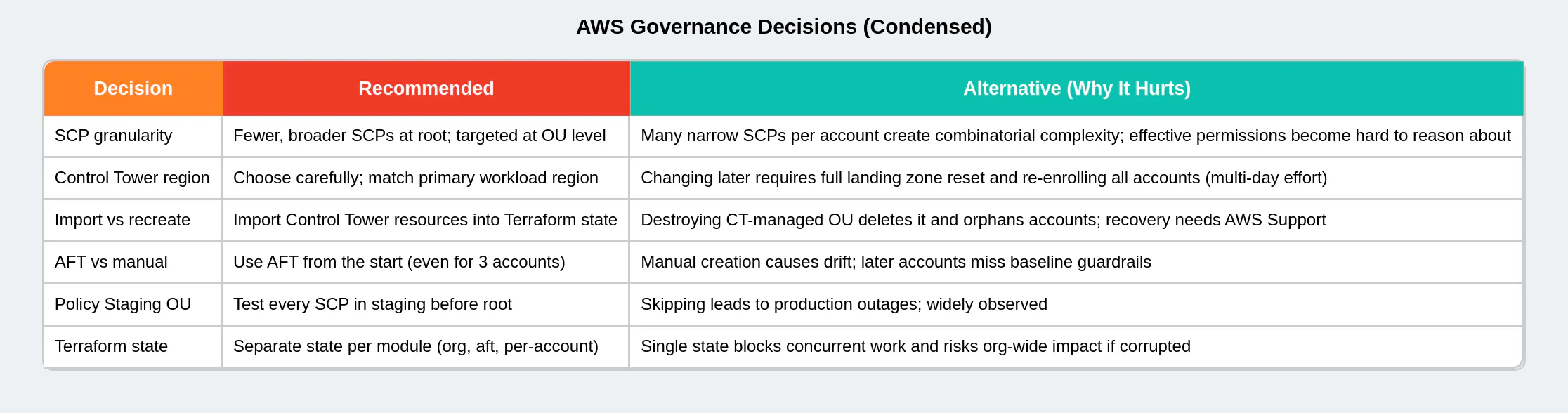
Pro Tip: Use aws_organizations_policy with lifecycle = prevent_destroy Add lifecycle { prevent_destroy = true } to all SCP resources and OU resources. This prevents an accidental terraform destroy from removing a policy that is protecting hundreds of accounts. You will still be able to modify the policy — just not delete it without explicitly removing the lifecycle block first, which forces deliberate intent.
Drift Detection and Ongoing Governance
Once deployed, the organization will drift if any changes are made outside Terraform — through the console, CLI, or other automation. Set up a scheduled Terraform plan in CI/CD (daily is sufficient) that runs in read-only mode and alerts on any diff. AWS Config rules and Control Tower's built-in drift detection provide a second layer of alerting. Treat any console change to organization resources as a production incident — investigate, document, and codify it in Terraform within 24 hours.
What's Next in This Series
At this point you have a fully functional, Terraform-managed AWS Organizations structure: Control Tower deployed, five OUs configured, six SCPs enforced, delegated administration configured for security services, and AFT ready to vend new accounts on demand.
Part 3 — SCPs, Guardrails & Day-2 Operations will go deeper into the operational side: the full SCP library for PCI, HIPAA, and SOC 2 compliance boundaries, managing Control Tower guardrail versions during updates, IAM Identity Center configuration for cross-account access, and the runbooks your team needs for day-2 operations including emergency break-glass access, account quarantine procedures, and SCP rollback playbooks.
About the Author
AWS Solutions Architect with 12+ years building cloud infrastructure at scale. This Terraform structure has been deployed in production across financial services, healthcare, and SaaS companies ranging from 50 to 50,000 employees. The SCPs in this article are based on real production guardrails, with account IDs and proprietary details abstracted.