Why Every Company Needs AWS Organizations — and How to Plan It Right
📚 Series: AWS Organizations: From Zero to Enterprise
- Part 1: Why Every Company Needs AWS Organizations — and How to Plan It Right (This one)
- Part 2: Setting Up AWS Control Tower, Organizations & SCPs with Terraform
- Part 3: SCPs, Guardrails & Day-2 Operations (coming soon)
The Problem: One Account Is a Time Bomb
I have been called in to help companies in crisis more times than I can count. The scenario is almost always the same: a team that moved fast, built aggressively, and ran everything in a single AWS account. Then one day, a developer runs terraform destroy in the wrong terminal. A misconfigured IAM policy grants a contractor access to production billing data. A security audit reveals that three teams share the same set of AWS credentials because "it was easier." A compliance review finds that PCI workloads sit on the same network segment as development environments.
None of these are hypothetical. All of them are preventable. And every single one of them becomes dramatically harder to cause — and dramatically easier to detect — once you have a proper multi-account structure in place.
"A single AWS account is not a foundation. It is a starting point that eventually collapses under the weight of organizational complexity."
The good news is that AWS has a native, well-designed solution: AWS Organizations. The better news is that standing it up correctly from the start costs very little in time or money. The hard news is that retrofitting it onto a sprawling, ungoverned account structure is one of the most painful cloud migration projects in existence. This article gives you the planning clarity to get it right from day one.
What Is AWS Organizations?
AWS Organizations is a global service that lets you consolidate multiple AWS accounts under a single management umbrella. At its core, it provides three things:
Consolidated Billing. All accounts in your organization roll their costs up to a single payer account. This is not just convenient — it unlocks volume discounts, Reserved Instance sharing across accounts, and unified Cost Explorer visibility. For companies spending more than $10,000/month on AWS, this alone often pays for the effort to set it up.
j
Centralized Governance. Service Control Policies (SCPs) are the mechanism that makes AWS Organizations truly powerful. They are IAM-like policy documents that you attach to Organizational Units (OUs) or individual accounts. Unlike IAM policies — which control what a principal can do — SCPs control the maximum permissions that can be granted in an account at all. Even the root user of a member account cannot perform an action that an SCP denies. This is a blast radius limiter at the organizational level.
Account Vending. Organizations provides the foundation to create new AWS accounts programmatically — in seconds — with the right defaults, guardrails, and network configurations pre-applied. This is what enables teams to move fast without breaking things: each team gets their own isolated account, and the organization's policies ensure a consistent security baseline regardless of what they build.
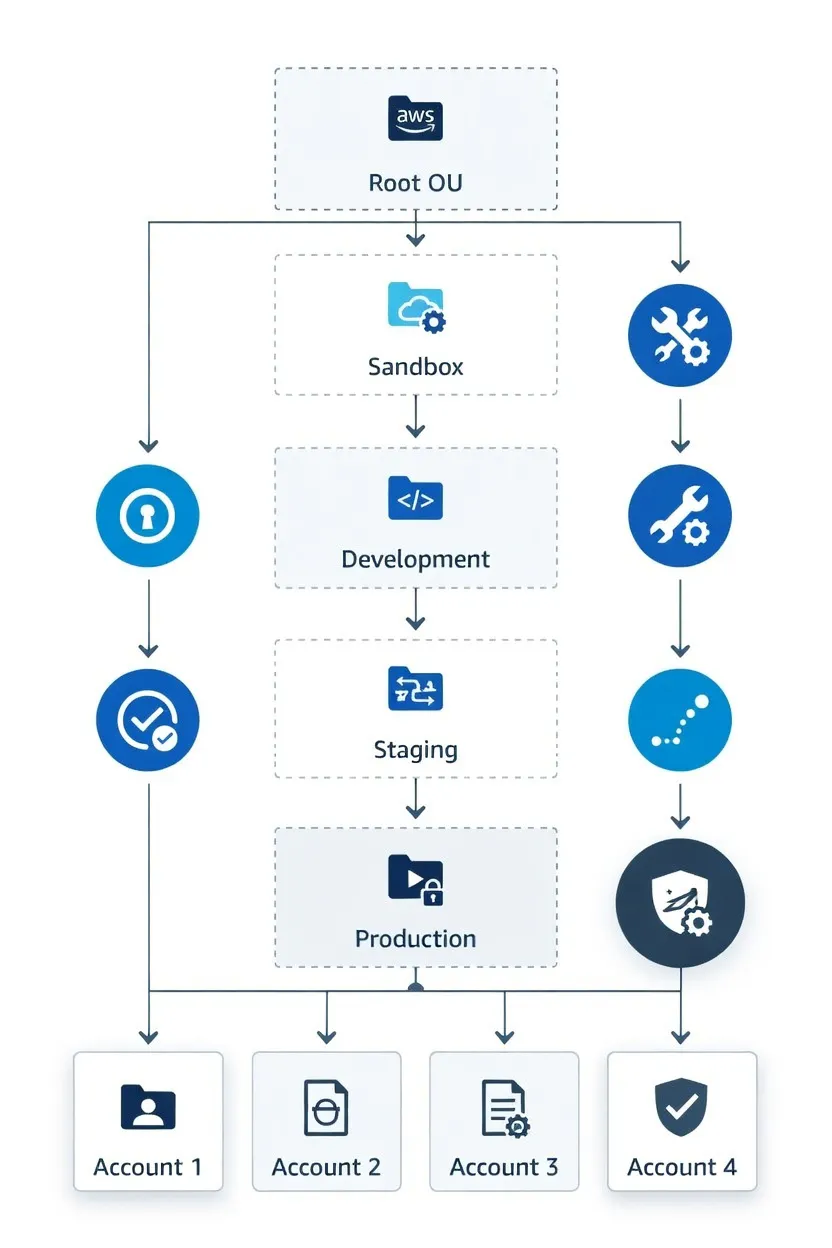
(Fig 1. Reference AWS Organizations structure showing a 5-OU layout. SCPs cascade from Root → OU → Account, with effective permissions being the intersection of all applied policies.)
Why It Matters by Company Stage
One of the biggest misconceptions I encounter is that multi-account architecture is an enterprise concern. It is not. The blast radius problem, the billing visibility problem, and the compliance problem all exist from day one of a production workload. The difference is only in complexity and consequence.
Stage 01: Startup
- Separate dev from prod immediately
- Consolidated billing from start
- Minimum viable SCPs to prevent accidents
- 3–5 accounts total
- Use Control Tower for speed
Stage 02: SMB / Scale-Up
- Per-team account isolation
- Dedicated security & audit accounts
- Compliance boundary enforcement
- 10–30 accounts typical
- Account vending pipeline needed
Stage 03: Enterprise
- Per-BU, per-env, per-app isolation
- Customized OU hierarchy
- Multi-region, multi-regulatory
- 100–1000+ accounts typical
- Automated guardrails essential
For a startup, the argument for AWS Organizations is about future-proofing. Setting up a basic three-account structure (Management, Production, Development) costs perhaps two hours of effort. Separating a monolithic account after eighteen months of growth costs weeks. I have watched this play out. The company that says "we'll fix the account structure once we grow" is the company that has a painful, risky migration project eighteen months later with real customers on the line.
For an SMB or scale-up, the argument shifts to operational efficiency and compliance. If your company handles PCI data, PHI, or SOC 2 workloads, account-level isolation is not optional — it is the cleanest way to draw scope boundaries for auditors. A misplaced RDS instance that happens to be on the same VPC as a cardholder data environment can scuttle an entire compliance certification.
For enterprise, the argument is about governance at scale. When you have 150 AWS accounts and 40 development teams, the only way to maintain a coherent security posture is through centralized policy enforcement. You cannot rely on every team doing the right thing. SCPs ensure they cannot do the wrong thing, regardless of intent.
Core Concepts You Must Understand First
Before diving into planning, there are five concepts that underpin everything. Getting these wrong at the planning stage leads to painful restructuring later.
1. Management Account: Handle With Extreme Care
The management account (formerly "master account") is the root of your organization. It has the ability to create, invite, and remove member accounts. It cannot have SCPs applied to it. Its root user is the ultimate fallback for your entire cloud estate.
Critical Rule Run zero production workloads in the management account. Ever. If the management account is compromised, every account in your organization is at risk. Treat it like a nuclear launch key: locked away, rarely accessed, and MFA-enforced.
2. Service Control Policies (SCPs): The Master Override
SCPs define the maximum permission boundary for every principal in an account, including the root user of that account. They use the same JSON syntax as IAM policies but are evaluated before IAM policies. A user with AdministratorAccess still cannot create an EC2 instance if an SCP denies ec2:RunInstances in that OU.
Common foundational SCPs to consider from day one:
Example SCP — Deny specific regions
{
  "Version": "2012-10-17",
  "Statement": [
    {
      "Sid": "DenyNonApprovedRegions",
      "Effect": "Deny",
      "NotAction": [
        "iam:*",
        "organizations:*",
        "support:*",
        "trustedadvisor:*",
        "cloudfront:*",
        "route53:*",
        "sts:AssumeRole"
      ],
      "Resource": "*",
      "Condition": {
        "StringNotEquals": {
          "aws:RequestedRegion": [
            "us-east-1",
            "us-west-2",
            "eu-west-1"
          ]
        }
      }
    }
  ]
}
3. Organizational Units (OUs): The Hierarchy Backbone
OUs are containers that group accounts and can have SCPs attached to them. A well-designed OU structure maps to your governance requirements, not your org chart. The most common mistake I see is designing OUs around business units. The better approach is designing OUs around governance requirements — because that is what SCPs will enforce.
4. Account Isolation: The Blast Radius Principle
In AWS, an account is the strongest isolation boundary available. VPCs provide network isolation, but they share IAM, billing, and service limits. Account boundaries, by contrast, enforce completely separate IAM namespaces, separate resource limits, and separate billing. The principle is simple: the cost of recovering from an incident should drive how much isolation you invest in. Production databases handling customer PII warrant their own account. A developer's personal sandbox does not.
5. Delegated Administration: Don't Bottleneck on Management Account
Many AWS services support delegated administration — designating a member account as the administrator for that service across the organization. Security Hub, GuardDuty, AWS Config, Firewall Manager, and others all support this. Your security team should run a dedicated Security Tools account with delegated admin for these services, keeping the management account reserved for organizational-level operations only.
Reference Architecture: Three-Tier OU Structure
After working through dozens of AWS Organizations implementations, I have converged on a reference architecture that balances simplicity with extensibility. It is intentionally opinionated — there are valid alternatives — but it works reliably across startup through enterprise scale.
- Root (Management Acct only): Organization root; baseline deny policies. SCP: Strictest — deny all unapproved regions, require MFA.
- Security OU (Log Archive, Audit, Tooling): Centralized security controls and immutable logs. SCP: Highly restrictive — deny deletion of logs, enforce encryption.
- Infrastructure OU (Network, DNS, Shared Services): Shared VPCs, Transit Gateway, Route 53 resolvers. SCP: Moderate — restrict to infrastructure team role only.
- Workloads OU (Per-team: Prod, Staging, Dev): Application workloads, fully isolated per team/env. SCP: Permissive within guardrails — allow building, deny compliance-breaking actions.
- Policy Staging OU (1–2 test accounts): Validate SCPs before applying to production. SCP: Mimics root policies — critical safety net.
- Sandbox OU (Per-developer accounts): Unrestricted experimentation with cost guardrails. SCP: Minimal — deny only truly dangerous actions; auto-nuke via budget.
Pro Tip: Policy Staging OU Never apply a new SCP directly to your Root or a production OU. Always test it in a Policy Staging OU first. An overly broad SCP deny can silently break workloads across hundreds of accounts — and debugging it under production pressure is not an enjoyable experience.
What to Plan Before You Build
The most expensive phase of any AWS Organizations implementation is the planning phase you skip. Here is a structured checklist of decisions to resolve before you run a single Terraform command.
Account Strategy Decisions
- Account naming convention: Decide on a consistent, programmatic naming scheme. A pattern like {company}-{team}-{environment} (e.g., acme-payments-prod) makes account-level filtering in Cost Explorer, CloudTrail, and IAM dramatically simpler.
- Account ownership model: Will accounts be owned by teams, products, or cost centers? This decision affects your OU design, tagging strategy, and chargeback model.
- Email address strategy: Each AWS account requires a unique email. Plan a distribution list pattern (e.g., aws+{account-name}@yourcompany.com) using email aliasing. Do not use personal emails.
- Initial account set: Define which accounts you need at launch. Minimum recommended: Management, Log Archive, Audit, Network, and one Workloads account per environment.
Governance and Policy Decisions
- Approved AWS regions: Define which regions your workloads are permitted to run in. Encode this as a Root-level SCP from day one. Unapproved region usage is a common compliance finding.
- Mandatory services: Decide which services must be enabled in all accounts — CloudTrail, Config, Security Hub, and GuardDuty are the standard baseline.
- Root user access: Plan your root credential storage strategy for each member account. Hardware MFA tokens or virtual MFA with a secure vault. Root credentials should essentially never be used after initial account setup.
- Break-glass access: Define how your security team can access any account in an emergency. Cross-account IAM roles with emergency access and full audit logging is the pattern.
Network and Connectivity Decisions
- IP address space: Plan your entire VPC CIDR allocation before provisioning a single subnet. Overlapping CIDR blocks make Transit Gateway routing impossible and VPC peering unusable. Treat this like physical data center IP planning — do it once, do it right.
- Transit Gateway vs VPC Peering: If you anticipate more than 5–10 accounts needing network connectivity, plan for Transit Gateway. The per-account peering mesh does not scale.
- DNS strategy: Decide on Route 53 Resolver rules and shared hosted zones before teams start creating independent DNS infrastructure in every account.
Operational Decisions
- Account vending automation: Even for three accounts, build the automation now. Control Tower Account Factory, Service Catalog, or a custom Terraform module — pick one and make it the only way to create new accounts.
- Cost allocation tags: Mandatory cost allocation tags applied at account creation via SCPs or account factory. These cannot be retrofitted easily and make FinOps dramatically simpler.
- Budget alerts: Per-account budget alerts from day one. For sandbox accounts, consider automated account suspension at threshold.
- Audit log retention: Immutable S3 bucket in the Log Archive account with Object Lock enabled. Organizational CloudTrail writing to it. Minimum 365 days for most compliance frameworks.
Warning: IP Address Planning Is Non-Negotiable I have seen this mistake end careers. If you provision accounts with overlapping CIDR blocks, you will have to tear down and rebuild your entire network architecture to enable account-to-account connectivity. Plan your IP space on a spreadsheet before you write a single line of Terraform. Reserve space for future growth — assume you will have 3x more accounts than you think you will.
Trade-offs and Common Mistakes
Every architecture decision involves trade-offs. Here are the ones that matter most for AWS Organizations, and the decisions I have seen teams get wrong in the field.
Control Tower vs Custom Build
AWS Control Tower is AWS's managed landing zone service. It provisions your Organizations structure, deploys baseline SCPs, enables security services, and sets up account vending — all through a console wizard or Terraform provider. The trade-off is that it is opinionated and constrains customization in some areas.
A custom-built Organizations structure using Terraform gives you complete flexibility but requires more implementation time and deep AWS expertise. You own the operational burden of keeping baseline configurations consistent across accounts.
- Setup Speed: Control Tower (Hours) vs Custom (Days/Weeks)
- Customization: Control Tower (Moderate) vs Custom (Full)
- Maintenance Overhead: Control Tower (Low/Managed) vs Custom (High)
- Best for Startups: Control Tower
- Best for Enterprise: Custom (or Combined)
My recommendation: Start with Control Tower unless you have very specific requirements it cannot meet. You can always layer custom Terraform on top of a Control Tower base. Starting with custom Terraform from scratch when Control Tower would have worked is a common case of over-engineering.
OU Depth: Keep It Shallow
AWS Organizations supports up to five levels of OU nesting. Resist the temptation to model your entire org chart in OUs. Deep hierarchies make SCP inheritance difficult to reason about and slow down account vending. Two or three levels of depth handles the vast majority of real-world governance requirements. When you find yourself creating a fourth level of nesting, reconsider whether you need a new OU or just a new tag.
The Retrofitting Problem
Moving a running production workload from a single account into a multi-account Organizations structure is the most common painful migration I encounter. The core challenges are: IAM roles with hardcoded account IDs, cross-service references that assume same-account resources, network configurations that assumed flat VPC topology, and billing configurations that assumed everything is in one place.
None of these are impossible to solve — but each requires careful planning, usually some downtime or dual-running costs, and extensive testing. The cost of retrofitting is always higher than the cost of doing it right initially.
Decision Framework: Are You Ready to Build?
Before you move on to Part 2 of this series (hands-on implementation with Control Tower and Terraform), use this checklist to validate your planning is complete:
- Account naming convention defined and documented with examples
- Email alias pattern confirmed with your email system administrator
- OU structure sketched on paper or a whiteboard — maximum 3 levels deep
- Approved AWS regions list finalized with sign-off from security team
- IP address plan completed covering all accounts, regions, and future growth (at minimum /8 per organization, /16 per account)
- Mandatory baseline services agreed: CloudTrail, Config, Security Hub, GuardDuty minimum
- Root credential storage strategy defined and physical MFA tokens procured or virtual MFA vault configured
- Account ownership model confirmed: team-based, product-based, or cost-center-based
- Cost allocation tags defined: minimum Environment, Team/Owner, Project, CostCenter
- Control Tower vs custom build decision made based on your team's bandwidth and requirements
- Stakeholders aligned: Security, Finance, Engineering Leadership have all reviewed and approved the plan
Time Investment Expectation For a startup: this planning work takes 2–4 hours. For an SMB: expect a 2-day working session with your security and platform team leads. For enterprise: plan for a 2–4 week design phase with formal architecture review. The implementation in Part 2 goes faster when this groundwork is solid.
What's Next in This Series
This article has been intentionally focused on the why and the what to plan. In Part 2 of this series, we move to full hands-on implementation:
Part 2 — Setting Up AWS Organizations & Control Tower will walk through the complete provisioning of a production-grade Organizations structure using Terraform and the Control Tower Terraform provider. We will cover: bootstrapping the management account, deploying the OU hierarchy, configuring the foundational SCP set, provisioning the Security and Log Archive accounts, and setting up the account vending pipeline via Account Factory for Terraform (AFT).