SCPs, Guardrails & Day-2 Operations — Running AWS Organizations in Production
📚 Series: AWS Organizations: From Zero to Enterprise — Part 3
Part 1: Why Every Company Needs AWS Organizations — and How to Plan It Right
Part 2: Setting Up AWS Control Tower, Organizations & SCPs with Terraform
Part 3: SCPs, Guardrails & Day-2 Operations (this article)
Parts 1 and 2 of this series covered the why and the how to build. Part 2 ended with a fully functional AWS Organizations structure: Control Tower deployed, five OUs configured, six foundational SCPs in place, and AFT ready to vend accounts. That is Day 1.
Day 2 is everything that happens next. New compliance requirements arrive. A Control Tower update introduces a breaking guardrail change. A developer accidentally quarantines their own sandbox account. The security team needs emergency access to a production account at 2 AM. A new regulation requires your European accounts to restrict data residency more aggressively than your current region SCP allows.
This article covers the operational layer that most landing zone guides skip: the extended SCP library for PCI DSS, HIPAA, and SOC 2 boundaries; managing Control Tower guardrail versions without disrupting production; configuring IAM Identity Center for cross-account access that scales; and the four runbooks your team needs before something goes wrong, not after.
The Day-2 Reality Check
Before diving in, it is worth being honest about what "Day 2" actually looks like in production. The most common gap I find when reviewing landing zones that were built by another team:
- SCPs exist but have never been tested against an actual IAM principal with real permissions
- Control Tower guardrails are on the version they were installed with — nobody has updated them since initial setup
- IAM Identity Center exists but everyone uses long-lived IAM users because the SSO setup "was never finished"
- Break-glass access is undocumented — the procedure exists only in one senior engineer's memory
- No runbooks exist — every incident response is improvised
Each of these is a time bomb. The sections below address them in priority order.
Extended SCP Library: Compliance Boundaries
Part 2 covered six foundational SCPs that apply to every organization regardless of compliance posture. This section adds three compliance-specific SCP layers: one for PCI DSS scope reduction, one for HIPAA technical safeguards, and one for SOC 2 operational controls. These are OU-level policies — they attach to specific Workload OUs containing in-scope accounts, not to the Root.
The critical design principle: compliance SCPs supplement foundational SCPs, they do not replace them. An account in a PCI OU has both the root-level foundational SCPs (region restriction, MFA enforcement, CT protection, root deny) AND the PCI-specific SCPs applied simultaneously. The effective permissions are the intersection of all attached policies.
SCP 7 — PCI DSS Scope Boundary
PCI DSS requires that cardholder data environments (CDE) are isolated from non-CDE systems. At the AWS account level, this means restricting the CDE account to a set of services that have been assessed and included in scope, and denying services that would create implicit data flows outside the boundary.
##############################################################
# SCP: PCI DSS Scope Boundary
# Attachment: Workloads/pci OU only
#
# Denies services with insufficient PCI DSS compliance coverage
# and enforces encryption and logging requirements.
# Review against your QSA's current service scope list annually.
##############################################################
data "aws_iam_policy_document" "pci_boundary" {

  # Deny services not in PCI DSS scope
  statement {
    sid    = "DenyNonPCIServices"
    effect = "Deny"
    actions = [
      "codecommit:*",        # Use GitHub with controls instead
      "cloud9:*",            # Browser IDE creates data egress risk
      "workspaces:*",        # Out of PCI scope
      "appstream:*",
      "chime:*",
      "connect:*",
      "lex:*",
      "polly:*",
      "rekognition:*",
      "transcribe:*",
      "translate:*",
    ]
    resources = ["*"]
  }

  # Deny unencrypted S3 bucket creation — PCI Req 3.5
  statement {
    sid    = "DenyUnencryptedS3"
    effect = "Deny"
    actions = ["s3:PutObject"]
    resources = ["*"]
    condition {
      test     = "StringNotEquals"
      variable = "s3:x-amz-server-side-encryption"
      values   = ["aws:kms", "AES256"]
    }
  }

  # Deny S3 buckets with public access — PCI Req 1.3
  statement {
    sid    = "DenyPublicS3ACLs"
    effect = "Deny"
    actions = [
      "s3:PutBucketAcl",
      "s3:PutObjectAcl",
    ]
    resources = ["*"]
    condition {
      test     = "StringEquals"
      variable = "s3:x-amz-acl"
      values   = ["public-read", "public-read-write", "authenticated-read"]
    }
  }

  # Require VPC endpoints — prevent cardholder data traversing public internet
  # PCI Req 4.2: PAN must not be transmitted over open/public networks
  statement {
    sid    = "DenyNonVPCEndpointS3Access"
    effect = "Deny"
    actions = ["s3:GetObject", "s3:PutObject"]
    resources = ["*"]
    condition {
      test     = "StringNotEquals"
      variable = "aws:SourceVpce"
      values   = var.pci_approved_vpce_ids  # Set in tfvars per account
    }
    condition {
      test     = "Bool"
      variable = "aws:ViaAWSService"
      values   = ["false"]
    }
  }

  # Deny disabling CloudTrail — PCI Req 10.2 (audit log integrity)
  statement {
    sid    = "DenyCloudTrailDisable"
    effect = "Deny"
    actions = [
      "cloudtrail:DeleteTrail",
      "cloudtrail:StopLogging",
      "cloudtrail:UpdateTrail",
    ]
    resources = ["*"]
  }

  # Deny security group rules permitting unrestricted inbound — PCI Req 1.2
  statement {
    sid    = "DenyOpenSecurityGroups"
    effect = "Deny"
    actions = [
      "ec2:AuthorizeSecurityGroupIngress",
      "ec2:AuthorizeSecurityGroupEgress",
    ]
    resources = ["*"]
    condition {
      test     = "IpAddress"
      variable = "ec2:cidr"
      values   = ["0.0.0.0/0", "::/0"]
    }
  }
}

variable "pci_approved_vpce_ids" {
  description = "VPC Endpoint IDs approved for PCI S3 access"
  type        = list(string)
}

resource "aws_organizations_policy" "pci_boundary" {
  name        = "PCIDSSBoundary"
  description = "PCI DSS scope reduction — attach to PCI workload OU only"
  content     = data.aws_iam_policy_document.pci_boundary.json
  type        = "SERVICE_CONTROL_POLICY"

  tags = { Compliance = "PCI-DSS", Scope = "ou-level" }

  lifecycle { prevent_destroy = true }
}

resource "aws_organizations_policy_attachment" "pci_boundary" {
  policy_id = aws_organizations_policy.pci_boundary.id
  target_id = aws_organizations_organizational_unit.team_ous["team-payments"].id
}
QSA Coordination Required SCPs can reduce your PCI DSS audit scope but they are not a substitute for QSA review. Share this SCP with your Qualified Security Assessor during scoping — they need to verify that the technical controls match your cardholder data flow documentation. The service deny list above is a starting point, not a certified control set.
SCP 8 — HIPAA Technical Safeguards
HIPAA's Security Rule requires administrative, physical, and technical safeguards for Protected Health Information (PHI). At the AWS account level, the technical safeguards translate to encryption requirements, audit logging, and access controls. AWS has a Business Associate Agreement (BAA) that covers specific services — the deny list below blocks services not covered under the BAA.
##############################################################
# SCP: HIPAA Technical Safeguards
# Attachment: Workloads/hipaa OU
#
# AWS BAA-covered services list changes periodically.
# Review at: https://aws.amazon.com/compliance/hipaa-eligible-services-reference/
# Last reviewed: 2025-Q3
##############################################################
data "aws_iam_policy_document" "hipaa_safeguards" {

  # Deny services not covered under the AWS Business Associate Agreement
  statement {
    sid    = "DenyNonBAAServices"
    effect = "Deny"
    actions = [
      # These services are NOT covered by the AWS BAA as of last review
      "alexa:*",
      "codecommit:*",
      "cloud9:*",
      "sumerian:*",
      "gamelift:*",
      "mturk:*",
    ]
    resources = ["*"]
  }

  # Require encryption at rest for RDS — HIPAA § 164.312(a)(2)(iv)
  statement {
    sid    = "DenyUnencryptedRDS"
    effect = "Deny"
    actions = ["rds:CreateDBInstance", "rds:CreateDBCluster"]
    resources = ["*"]
    condition {
      test     = "Bool"
      variable = "rds:StorageEncrypted"
      values   = ["false"]
    }
  }

  # Deny unencrypted EBS volumes — HIPAA § 164.312(a)(2)(iv)
  statement {
    sid    = "DenyUnencryptedEBS"
    effect = "Deny"
    actions = ["ec2:CreateVolume"]
    resources = ["arn:aws:ec2:*:*:volume/*"]
    condition {
      test     = "Bool"
      variable = "ec2:Encrypted"
      values   = ["false"]
    }
  }

  # Deny unencrypted SQS queues
  statement {
    sid    = "DenyUnencryptedSQS"
    effect = "Deny"
    actions = ["sqs:CreateQueue"]
    resources = ["*"]
    condition {
      test     = "Null"
      variable = "sqs:KmsMasterKeyId"
      values   = ["true"]
    }
  }

  # Deny SNS topics without encryption
  statement {
    sid    = "DenyUnencryptedSNS"
    effect = "Deny"
    actions = ["sns:CreateTopic"]
    resources = ["*"]
    condition {
      test     = "Null"
      variable = "sns:KmsMasterKeyId"
      values   = ["true"]
    }
  }

  # Deny deletion of VPC Flow Logs — required for audit trail of PHI access
  statement {
    sid    = "DenyVPCFlowLogDeletion"
    effect = "Deny"
    actions = [
      "ec2:DeleteFlowLogs",
      "logs:DeleteLogGroup",
      "logs:DeleteLogStream",
    ]
    resources = ["*"]
  }

  # Deny disabling GuardDuty — HIPAA requires continuous monitoring
  statement {
    sid    = "DenyGuardDutyDisable"
    effect = "Deny"
    actions = [
      "guardduty:DeleteDetector",
      "guardduty:DisassociateFromMasterAccount",
      "guardduty:StopMonitoringMembers",
    ]
    resources = ["*"]
  }
}

resource "aws_organizations_policy" "hipaa_safeguards" {
  name        = "HIPAATechnicalSafeguards"
  description = "HIPAA Security Rule technical safeguards — attach to PHI workload OU only"
  content     = data.aws_iam_policy_document.hipaa_safeguards.json
  type        = "SERVICE_CONTROL_POLICY"

  tags = { Compliance = "HIPAA", Scope = "ou-level" }

  lifecycle { prevent_destroy = true }
}
SCP 9 — SOC 2 Operational Controls
SOC 2 Type II audits evaluate your controls over a period of time — typically 6 or 12 months. The SCPs below enforce controls in the Change Management, Logical Access, and Availability trust service criteria.
##############################################################
# SCP: SOC 2 Operational Controls
# Attachment: Workloads OU (root-level for SOC 2 scope)
#
# Enforces controls across Change Management (CC8),
# Logical Access (CC6), and Availability (A1) criteria.
##############################################################
data "aws_iam_policy_document" "soc2_controls" {

  # CC8.1 — Change management: deny direct Lambda code updates outside pipeline
  # Forces all code changes through the CI/CD pipeline where approvals are logged
  statement {
    sid    = "DenyDirectLambdaCodeUpdate"
    effect = "Deny"
    actions = [
      "lambda:UpdateFunctionCode",
      "lambda:UpdateFunctionConfiguration",
    ]
    resources = ["*"]
    condition {
      test     = "StringNotLike"
      variable = "aws:PrincipalArn"
      # Allow only the CI/CD pipeline role and break-glass role
      values = [
        "arn:aws:iam::*:role/CICDDeployRole",
        "arn:aws:iam::*:role/BreakGlassRole",
      ]
    }
  }

  # CC6.1 — Logical access: deny IAM user creation (enforce SSO-only access)
  # All human access should come through IAM Identity Center, not IAM users
  statement {
    sid    = "DenyIAMUserCreation"
    effect = "Deny"
    actions = [
      "iam:CreateUser",
      "iam:CreateAccessKey",
    ]
    resources = ["*"]
    condition {
      test     = "StringNotLike"
      variable = "aws:PrincipalArn"
      values   = ["arn:aws:iam::*:role/BreakGlassRole"]
    }
  }

  # CC6.6 — Prevent security group changes by non-network roles
  statement {
    sid    = "RestrictSecurityGroupModification"
    effect = "Deny"
    actions = [
      "ec2:AuthorizeSecurityGroupIngress",
      "ec2:RevokeSecurityGroupIngress",
      "ec2:DeleteSecurityGroup",
    ]
    resources = ["*"]
    condition {
      test     = "StringNotLike"
      variable = "aws:PrincipalArn"
      values = [
        "arn:aws:iam::*:role/NetworkAdminRole",
        "arn:aws:iam::*:role/CICDDeployRole",
        "arn:aws:iam::*:role/BreakGlassRole",
      ]
    }
  }

  # A1.2 — Availability: deny deletion of backup plans and recovery points
  statement {
    sid    = "DenyBackupDeletion"
    effect = "Deny"
    actions = [
      "backup:DeleteBackupPlan",
      "backup:DeleteBackupVault",
      "backup:DeleteRecoveryPoint",
      "backup:StopBackupJob",
    ]
    resources = ["*"]
  }

  # CC7.2 — Deny disabling Security Hub findings aggregation
  statement {
    sid    = "DenySecurityHubDisable"
    effect = "Deny"
    actions = [
      "securityhub:DeleteHub",
      "securityhub:DisableSecurityHub",
      "securityhub:DisassociateFromMasterAccount",
    ]
    resources = ["*"]
  }
}

resource "aws_organizations_policy" "soc2_controls" {
  name        = "SOC2OperationalControls"
  description = "SOC 2 Type II control enforcement — CC6, CC8, A1 criteria"
  content     = data.aws_iam_policy_document.soc2_controls.json
  type        = "SERVICE_CONTROL_POLICY"

  tags = { Compliance = "SOC2", Scope = "workloads-ou" }

  lifecycle { prevent_destroy = true }
}

resource "aws_organizations_policy_attachment" "soc2_controls" {
  policy_id = aws_organizations_policy.soc2_controls.id
  target_id = aws_organizations_organizational_unit.workloads.id
}
SCP Testing — Never Skip This Step
Every SCP in this article was tested using aws iam simulate-principal-policy before being attached to a production OU. Here is the testing workflow, automated as a shell script you can run against your Policy Staging account:
#!/usr/bin/env bash
# test-scp.sh — Validate SCP effects against a test principal
# Run this BEFORE attaching any SCP to a production OU
#
# Usage: ./test-scp.sh <principal-arn> <action> <resource>
# Example: ./test-scp.sh arn:aws:iam::123456789:role/DevRole s3:PutObject "*"

set -euo pipefail

PRINCIPAL_ARN="${1}"
ACTION="${2}"
RESOURCE="${3:-*}"
ACCOUNT_ID=$(aws sts get-caller-identity --query Account --output text)

echo "Testing: ${PRINCIPAL_ARN} → ${ACTION} on ${RESOURCE}"
echo "Account: ${ACCOUNT_ID}"
echo ""

RESULT=$(aws iam simulate-principal-policy \
  --policy-source-arn "${PRINCIPAL_ARN}" \
  --action-names "${ACTION}" \
  --resource-arns "${RESOURCE}" \
  --query 'EvaluationResults[0].EvalDecision' \
  --output text)

echo "Decision: ${RESULT}"

if [[ "${RESULT}" == "allowed" ]]; then
  echo "✅ Action is ALLOWED — if you expected a deny, check SCP conditions"
elif [[ "${RESULT}" == "explicitDeny" ]]; then
  echo "🚫 Action is EXPLICITLY DENIED — SCP is working correctly"
elif [[ "${RESULT}" == "implicitDeny" ]]; then
  echo "⚠️  Action is IMPLICITLY DENIED — no allow policy grants this action"
fi
Always validate three scenarios per SCP:
- The deny case — an action that should be blocked is blocked
- The allow case — a legitimate action in your approved list is not accidentally blocked
- The service exclusion case — global services (IAM, STS, Route 53) are not affected by region-scoped denies
Managing Control Tower Guardrail Versions
Control Tower ships with two types of guardrails: mandatory (cannot be disabled) and elective (opt-in). AWS releases Control Tower updates roughly every 4–6 weeks. Each update can add new mandatory guardrails, modify existing guardrail logic, or deprecate old guardrails. The operational risk: if you do not manage updates deliberately, a Control Tower update can silently change guardrail behaviour in production accounts.
The Guardrail Drift Problem
Here is the failure mode I have seen repeatedly. A team deploys Control Tower and walks away. Six months later, AWS releases an update that introduces a new mandatory guardrail — for example, requiring that CloudTrail S3 bucket access logging is enabled. The guardrail is applied automatically to all enrolled accounts. One of those accounts has a Terraform-managed CloudTrail that predates this requirement. The guardrail flags it as non-compliant. The account enters a "drifted" state in Control Tower's dashboard. The platform team investigates — but by now there are 12 accounts in drift and nobody is sure which guardrail changes triggered it.
The solution is to treat Control Tower updates with the same discipline as application deployments: staged rollout, validation, and rollback capability.
Guardrail Update Procedure
#!/usr/bin/env bash
# ct-update-check.sh — Check for available Control Tower updates
# Run weekly as a scheduled GitHub Actions job

set -euo pipefail

echo "=== Control Tower Landing Zone Status ==="
aws controltower list-landing-zones \
  --query 'landingZones[0].{Version:version, Status:status, DriftStatus:driftStatus}' \
  --output table

echo ""
echo "=== Accounts in Drift ==="
aws controltower list-landing-zones \
  --query 'landingZones[0].driftStatus' \
  --output text

echo ""
echo "=== All Enabled Controls and their Status ==="
# List all controls across the organization
aws controltower list-enabled-controls \
  --target-identifier $(aws organizations list-roots --query 'Roots[0].Arn' --output text) \
  --query 'enabledControls[?controlIdentifier!=null].[controlIdentifier,statusSummary.status]' \
  --output table 2>/dev/null || echo "Use Control Tower console for full control listing"

echo ""
echo "=== Enrolled Accounts Status ==="
aws controltower list-managed-accounts \
  --query 'managedAccounts[?status!=`ENROLLED`].[name,status]' \
  --output table 2>/dev/null || echo "All accounts enrolled — no drift detected"
Staged Guardrail Rollout with Terraform
When AWS releases a Control Tower update, do not apply it organization-wide immediately. Use the PolicyStaging OU from Part 2 as your canary:
##############################################################
# Staged guardrail enablement — test in PolicyStaging first
#
# Step 1: Enable in PolicyStaging OU → observe for 48 hours
# Step 2: Enable in Sandbox OU → observe for 24 hours
# Step 3: Enable in Workloads OU → full production rollout
#
# Use a feature flag variable to control rollout stage
##############################################################

variable "new_guardrail_rollout_stage" {
  description = "Controls staged rollout of new guardrails"
  type        = string
  default     = "policy-staging"  # Start here. Promote to: sandbox → workloads → root

  validation {
    condition     = contains(["policy-staging", "sandbox", "workloads", "root"], var.new_guardrail_rollout_stage)
    error_message = "Must be one of: policy-staging, sandbox, workloads, root"
  }
}

locals {
  # Map rollout stage to OU target IDs
  guardrail_target_ids = {
    "policy-staging" = [aws_organizations_organizational_unit.policy_staging.id]
    "sandbox"        = [aws_organizations_organizational_unit.policy_staging.id, aws_organizations_organizational_unit.sandbox.id]
    "workloads"      = [aws_organizations_organizational_unit.policy_staging.id, aws_organizations_organizational_unit.sandbox.id, aws_organizations_organizational_unit.workloads.id]
    "root"           = [local.root_id]
  }
}

# Example: new elective guardrail — Detect public RDS snapshots
# AWS Control Tower identifier format: arn:aws:controltower:REGION::control/IDENTIFIER
resource "aws_controltower_control" "detect_public_rds_snapshots" {
  for_each = toset(local.guardrail_target_ids[var.new_guardrail_rollout_stage])

  control_identifier = "arn:aws:controltower:us-east-1::control/AWS-GR_RDS_SNAPSHOTS_PUBLIC_PROHIBITED"
  target_identifier  = each.value
}
To promote from Policy Staging to Sandbox:
# In terraform.tfvars — change the stage and apply
# new_guardrail_rollout_stage = "sandbox"
terraform apply -var='new_guardrail_rollout_stage=sandbox'
IAM Identity Center — Cross-Account Access That Scales
IAM Identity Center (formerly AWS SSO) is how humans access your AWS accounts in a multi-account organization. It replaces the pattern of creating IAM users with long-lived access keys in every account — a pattern that creates credential sprawl, makes access reviews painful, and is consistently flagged in every security audit.
The goal: every human authenticates once through IAM Identity Center and gets time-limited credentials with the minimum permissions needed for their current task.
Permission Set Design
Permission Sets in IAM Identity Center map to IAM roles that are created in each account. Design them around job functions, not individuals:
##############################################################
# IAM Identity Center Permission Sets
# Principle: job-function based, not individual-based
# All permission sets use AWS managed policies as a baseline,
# with inline policies for organization-specific restrictions
##############################################################

locals {
  permission_sets = {
    # Platform engineers — broad access, required for infrastructure management
    "PlatformEngineer" = {
      description      = "Platform engineering team — infrastructure management"
      session_duration = "PT8H"   # 8 hours — active working session
      managed_policies = ["arn:aws:iam::aws:policy/AdministratorAccess"]
      inline_policy    = null     # Full access — trust the team
    }

    # Developers — can build, cannot touch security or billing config
    "Developer" = {
      description      = "Application developer — deploy and debug workloads"
      session_duration = "PT4H"
      managed_policies = ["arn:aws:iam::aws:policy/PowerUserAccess"]
      inline_policy    = file("${path.module}/policies/developer-restrictions.json")
    }

    # Security analysts — read access everywhere, write in Security OU only
    "SecurityAnalyst" = {
      description      = "Security team — read-only across org, write in security accounts"
      session_duration = "PT8H"
      managed_policies = [
        "arn:aws:iam::aws:policy/SecurityAudit",
        "arn:aws:iam::aws:policy/ReadOnlyAccess",
      ]
      inline_policy = null
    }

    # Read-only access for finance, PMs, and compliance reviewers
    "ReadOnly" = {
      description      = "Read-only access for non-engineering stakeholders"
      session_duration = "PT4H"
      managed_policies = ["arn:aws:iam::aws:policy/ReadOnlyAccess"]
      inline_policy    = null
    }

    # Break-glass — tightly controlled, heavily audited, time-limited
    "BreakGlass" = {
      description      = "Emergency access — triggers PagerDuty alert on use"
      session_duration = "PT1H"   # 1 hour maximum — forces re-authentication
      managed_policies = ["arn:aws:iam::aws:policy/AdministratorAccess"]
      inline_policy    = null
    }
  }
}

resource "aws_ssoadmin_permission_set" "sets" {
  for_each = local.permission_sets

  name             = each.key
  description      = each.value.description
  instance_arn     = data.aws_ssoadmin_instances.this.arns[0]
  session_duration = each.value.session_duration

  tags = { ManagedBy = "Terraform" }
}

# Attach AWS managed policies
resource "aws_ssoadmin_managed_policy_attachment" "attachments" {
  for_each = {
    for combo in flatten([
      for ps_name, ps in local.permission_sets : [
        for policy_arn in ps.managed_policies : {
          key        = "${ps_name}-${basename(policy_arn)}"
          ps_name    = ps_name
          policy_arn = policy_arn
        }
      ]
    ]) : combo.key => combo
  }

  instance_arn       = data.aws_ssoadmin_instances.this.arns[0]
  managed_policy_arn = each.value.policy_arn
  permission_set_arn = aws_ssoadmin_permission_set.sets[each.value.ps_name].arn
}

# Account assignments — control who gets which permission set in which account
resource "aws_ssoadmin_account_assignment" "assignments" {
  for_each = {
    # Platform team gets PlatformEngineer in all accounts
    "platform-infra-prod" = {
      group_name     = "platform-engineers"
      permission_set = "PlatformEngineer"
      account_id     = var.network_account_id
    }
    # Payments team gets Developer in their own accounts only
    "payments-dev-prod" = {
      group_name     = "team-payments"
      permission_set = "Developer"
      account_id     = var.payments_prod_account_id
    }
    # Security team gets SecurityAnalyst everywhere
    "security-all-prod" = {
      group_name     = "security-team"
      permission_set = "SecurityAnalyst"
      account_id     = var.audit_account_id
    }
  }

  instance_arn       = data.aws_ssoadmin_instances.this.arns[0]
  permission_set_arn = aws_ssoadmin_permission_set.sets[each.value.permission_set].arn
  principal_id       = data.aws_identitystore_group.groups[each.value.group_name].group_id
  principal_type     = "GROUP"
  target_id          = each.value.account_id
  target_type        = "AWS_ACCOUNT"
}
AWS CLI Profile Configuration for Engineers
Once Identity Center is configured, engineers configure their AWS CLI to use it. This replaces long-lived access keys entirely:
# Configure AWS CLI to use IAM Identity Center — run once per engineer
aws configure sso

# Follow the prompts:
# SSO session name: my-company-sso
# SSO start URL: https://your-company.awsapps.com/start
# SSO region: us-east-1
# SSO registration scopes: sso:account:access

# This creates named profiles in ~/.aws/config — one per account/role combo:
# [profile my-company-payments-prod-developer]
# sso_session = my-company-sso
# sso_account_id = 123456789012
# sso_role_name = Developer
# region = eu-west-1

# Login (opens browser, valid for the session_duration configured)
aws sso login --profile my-company-payments-prod-developer

# Use it
aws s3 ls --profile my-company-payments-prod-developer

# Or set as default for the terminal session
export AWS_PROFILE=my-company-payments-prod-developer
Day-2 Operational Runbooks
The following four runbooks cover the scenarios that are most likely to wake your team up at night. Each is written to be followed under pressure — step-by-step, with verification commands, and explicit rollback instructions.
Runbook 1 — Break-Glass Emergency Access
When to use: A production incident requires immediate access to an account and the normal IAM Identity Center path is unavailable (SSO outage, identity provider down, account lockout).
Prerequisites: The BreakGlass IAM role must be pre-created in every account via AFT customizations, with cross-account trust to the management account. This runbook fails if the role was not pre-created.
#!/usr/bin/env bash
# break-glass-access.sh
# SECURITY: Every invocation creates a CloudTrail event and triggers a PagerDuty alert.
# MANDATORY: Open an incident ticket before running this script.
# TIME LIMIT: Break-glass sessions are limited to 1 hour by permission set config.

set -euo pipefail

TARGET_ACCOUNT_ID="${1:?Usage: ./break-glass-access.sh <account-id> <reason>}"
REASON="${2:?Provide a reason for break-glass access}"
OPERATOR=$(aws sts get-caller-identity --query Arn --output text)
TIMESTAMP=$(date -u +"%Y-%m-%dT%H:%M:%SZ")

echo "============================================"
echo "  BREAK-GLASS ACCESS — SECURITY EVENT"
echo "============================================"
echo "Operator  : ${OPERATOR}"
echo "Target    : ${TARGET_ACCOUNT_ID}"
echo "Reason    : ${REASON}"
echo "Time      : ${TIMESTAMP}"
echo "============================================"
echo ""

# Step 1: Log the access attempt to the central CloudTrail (via a CloudWatch event)
aws events put-events --entries "[{
  \"Source\": \"security.break-glass\",
  \"DetailType\": \"BreakGlassAccess\",
  \"Detail\": \"{\\\"operator\\\": \\\"${OPERATOR}\\\", \\\"targetAccount\\\": \\\"${TARGET_ACCOUNT_ID}\\\", \\\"reason\\\": \\\"${REASON}\\\", \\\"timestamp\\\": \\\"${TIMESTAMP}\\\"}\",
  \"EventBusName\": \"default\"
}]" 2>/dev/null || echo "Warning: could not publish to EventBridge — verify CloudTrail captures this action"

# Step 2: Assume the break-glass role in the target account
echo "Assuming BreakGlassRole in account ${TARGET_ACCOUNT_ID}..."
CREDS=$(aws sts assume-role \
  --role-arn "arn:aws:iam::${TARGET_ACCOUNT_ID}:role/BreakGlassRole" \
  --role-session-name "BreakGlass-${OPERATOR##*/}-$(date +%s)" \
  --duration-seconds 3600 \
  --output json)

# Step 3: Export credentials
export AWS_ACCESS_KEY_ID=$(echo $CREDS | jq -r '.Credentials.AccessKeyId')
export AWS_SECRET_ACCESS_KEY=$(echo $CREDS | jq -r '.Credentials.SecretAccessKey')
export AWS_SESSION_TOKEN=$(echo $CREDS | jq -r '.Credentials.SessionToken')
EXPIRY=$(echo $CREDS | jq -r '.Credentials.Expiration')

echo ""
echo "✅ Break-glass access granted"
echo "   Expires: ${EXPIRY}"
echo "   Session credentials exported to environment"
echo ""
echo "REMINDER: Document all actions taken in the incident ticket."
echo "          Credentials expire in 1 hour and cannot be renewed."
echo ""

# Step 4: Verify access
aws sts get-caller-identity
Post-incident procedure: Within 24 hours of using break-glass access, the on-call engineer must:
- Document every AWS API call made during the session in the incident ticket (use CloudTrail filter on the session ARN)
- Determine whether the underlying access gap should be addressed by adding a new IAM Identity Center permission set
- Submit a PR to the infrastructure repo updating the runbook if any steps were unclear
Runbook 2 — SCP Rollback
When to use: A newly applied SCP is causing unexpected access denials in production accounts. Time is critical — this runbook prioritises restoring access over root cause analysis.
#!/usr/bin/env bash
# scp-rollback.sh — Detach an SCP from a target without deleting it
# The SCP policy document is preserved — only the attachment is removed.

set -euo pipefail

POLICY_ID="${1:?Usage: ./scp-rollback.sh <policy-id> <target-id>}"
TARGET_ID="${2:?Provide the OU ID or account ID to detach from}"

echo "SCP Rollback"
echo "Policy  : ${POLICY_ID}"
echo "Target  : ${TARGET_ID}"
echo ""

# Step 1: Verify the policy exists and is attached to the target
echo "Verifying attachment..."
aws organizations list-policies-for-target \
  --target-id "${TARGET_ID}" \
  --filter SERVICE_CONTROL_POLICY \
  --query "Policies[?Id=='${POLICY_ID}'].{Name:Name, Id:Id}" \
  --output table

# Step 2: Detach the SCP
echo ""
echo "Detaching SCP ${POLICY_ID} from ${TARGET_ID}..."
aws organizations detach-policy \
  --policy-id "${POLICY_ID}" \
  --target-id "${TARGET_ID}"

echo "✅ SCP detached — access restrictions from this policy are removed"
echo ""

# Step 3: Verify detachment
echo "Verifying detachment..."
REMAINING=$(aws organizations list-policies-for-target \
  --target-id "${TARGET_ID}" \
  --filter SERVICE_CONTROL_POLICY \
  --query "Policies[?Id=='${POLICY_ID}'] | length(@)" \
  --output text)

if [ "${REMAINING}" -eq 0 ]; then
  echo "✅ Confirmed: policy no longer attached to ${TARGET_ID}"
else
  echo "❌ ERROR: policy still appears attached — check manually in console"
  exit 1
fi

echo ""
echo "NEXT STEPS:"
echo "  1. Test that the blocked action now works correctly"
echo "  2. Identify which SCP statement caused the denial (use CloudTrail)"
echo "  3. Fix the policy document in Terraform and test in PolicyStaging OU"
echo "  4. Re-attach via Terraform after validation: terraform apply"
echo ""
echo "IMPORTANT: Update the Terraform state to reflect this manual detachment:"
echo "  terraform state rm aws_organizations_policy_attachment.<resource_name>"
echo "  This prevents Terraform from re-attaching on next plan/apply."
Terraform State Warning Manually detaching an SCP with the CLI creates drift between your Terraform state and AWS reality. Run terraform state rm on the attachment resource immediately after the rollback, then fix the policy and re-apply through the normal CI/CD pipeline. If you skip this step, the next terraform apply will re-attach the broken SCP.
Runbook 3 — Account Quarantine
When to use: A member account shows signs of compromise (unusual API activity, unexpected resource creation, GuardDuty High severity finding, unexpected IAM role creation). You need to stop the blast radius immediately while preserving forensic evidence.
Quarantine principle: Deny all new actions while preserving existing resources. Do not delete anything — forensic evidence is critical for incident response.
#!/usr/bin/env bash
# quarantine-account.sh — Isolate a compromised account
# This script applies a Deny-all SCP to a specific account.
# It does NOT delete resources — it stops further damage.

set -euo pipefail

TARGET_ACCOUNT_ID="${1:?Usage: ./quarantine-account.sh <account-id> <incident-ticket>}"
INCIDENT_TICKET="${2:?Provide incident ticket ID}"

echo "============================================"
echo "  ACCOUNT QUARANTINE PROCEDURE"
echo "============================================"
echo "Account : ${TARGET_ACCOUNT_ID}"
echo "Ticket  : ${INCIDENT_TICKET}"
echo "Time    : $(date -u)"
echo "============================================"
echo ""
echo "WARNING: This will deny ALL actions in the target account."
echo "Any running workloads will be unable to make new API calls."
echo "Existing resources (EC2, RDS, etc.) will continue running."
echo ""
read -p "Confirm quarantine of account ${TARGET_ACCOUNT_ID}? (type 'QUARANTINE' to confirm): " CONFIRM

if [ "${CONFIRM}" != "QUARANTINE" ]; then
  echo "Aborted."
  exit 1
fi

# Step 1: Create the deny-all quarantine SCP
echo ""
echo "Creating quarantine SCP..."
POLICY_ID=$(aws organizations create-policy \
  --name "QUARANTINE-${TARGET_ACCOUNT_ID}-${INCIDENT_TICKET}" \
  --description "Account quarantine — incident ${INCIDENT_TICKET}" \
  --type SERVICE_CONTROL_POLICY \
  --content '{
    "Version": "2012-10-17",
    "Statement": [{
      "Sid": "DenyAll",
      "Effect": "Deny",
      "Action": "*",
      "Resource": "*",
      "Condition": {
        "StringNotLike": {
          "aws:PrincipalArn": [
            "arn:aws:iam::*:role/BreakGlassRole",
            "arn:aws:iam::*:role/aws-controltower-*",
            "arn:aws:iam::*:role/AWSControlTower*"
          ]
        }
      }
    }]
  }' \
  --query 'Policy.PolicySummary.Id' \
  --output text)

echo "Created policy: ${POLICY_ID}"

# Step 2: Attach directly to the account (not the OU)
echo "Attaching quarantine SCP to account ${TARGET_ACCOUNT_ID}..."
aws organizations attach-policy \
  --policy-id "${POLICY_ID}" \
  --target-id "${TARGET_ACCOUNT_ID}"

echo ""
echo "✅ Account ${TARGET_ACCOUNT_ID} is QUARANTINED"
echo "   Policy ID: ${POLICY_ID}"
echo "   Only BreakGlassRole and Control Tower roles can act in this account"
echo ""
echo "FORENSIC STEPS:"
echo "  1. Pull CloudTrail events from the last 24h:"
echo "     aws cloudtrail lookup-events --lookup-attributes AttributeKey=AccountId,AttributeValue=${TARGET_ACCOUNT_ID}"
echo "  2. Check for unexpected IAM roles or users:"
echo "     aws iam list-roles --query 'Roles[?contains(RoleName, \`unexpected\`)]'"
echo "  3. Check for S3 bucket policy changes (common exfil vector):"
echo "     aws s3api get-bucket-policy --bucket <bucket-name>"
echo ""
echo "TO RELEASE QUARANTINE (after incident resolution):"
echo "  aws organizations detach-policy --policy-id ${POLICY_ID} --target-id ${TARGET_ACCOUNT_ID}"
echo "  aws organizations delete-policy --policy-id ${POLICY_ID}"
Runbook 4 — New Account Onboarding Validation
When to use: After AFT vends a new account, validate that all baseline controls are correctly applied before handing the account to a team. This runbook takes approximately 10 minutes and prevents the scenario where a team spends a week building in an account that turns out to be missing a guardrail.
#!/usr/bin/env bash
# validate-account.sh — Post-vend account validation
# Run after AFT completes provisioning, before handing account to team

set -euo pipefail

ACCOUNT_ID="${1:?Usage: ./validate-account.sh <account-id>}"
REGION="${2:-us-east-1}"

echo "Account Validation: ${ACCOUNT_ID}"
echo "Region: ${REGION}"
echo ""

PASS=0
FAIL=0

check() {
  local description="$1"
  local result="$2"
  local expected="$3"

  if [ "${result}" = "${expected}" ]; then
    echo "  ✅ PASS: ${description}"
    ((PASS++)) || true
  else
    echo "  ❌ FAIL: ${description}"
    echo "     Expected: ${expected}"
    echo "     Got     : ${result}"
    ((FAIL++)) || true
  fi
}

# Assume a read-only role in the target account for validation
CREDS=$(aws sts assume-role \
  --role-arn "arn:aws:iam::${ACCOUNT_ID}:role/AWSControlTowerExecution" \
  --role-session-name "AccountValidation" \
  --output json)

export AWS_ACCESS_KEY_ID=$(echo $CREDS | jq -r '.Credentials.AccessKeyId')
export AWS_SECRET_ACCESS_KEY=$(echo $CREDS | jq -r '.Credentials.SecretAccessKey')
export AWS_SESSION_TOKEN=$(echo $CREDS | jq -r '.Credentials.SessionToken')

echo "--- CloudTrail ---"
CT_STATUS=$(aws cloudtrail get-trail-status \
  --name aws-controltower-BaselineCloudTrail \
  --region "${REGION}" \
  --query 'IsLogging' --output text 2>/dev/null || echo "false")
check "CloudTrail logging enabled" "${CT_STATUS}" "True"

echo ""
echo "--- AWS Config ---"
CONFIG_STATUS=$(aws configservice describe-configuration-recorder-status \
  --region "${REGION}" \
  --query 'ConfigurationRecordersStatus[0].recording' --output text 2>/dev/null || echo "false")
check "Config recorder active" "${CONFIG_STATUS}" "true"

echo ""
echo "--- GuardDuty ---"
GD_STATUS=$(aws guardduty list-detectors \
  --region "${REGION}" \
  --query 'DetectorIds | length(@)' --output text 2>/dev/null || echo "0")
check "GuardDuty detector exists" "${GD_STATUS}" "1"

echo ""
echo "--- Security Hub ---"
SH_STATUS=$(aws securityhub describe-hub \
  --region "${REGION}" \
  --query 'HubArn' --output text 2>/dev/null | grep -c "arn" || echo "0")
check "Security Hub enabled" "${SH_STATUS}" "1"

echo ""
echo "--- S3 Public Access Block ---"
S3_BLOCK=$(aws s3control get-public-access-block \
  --account-id "${ACCOUNT_ID}" \
  --query 'PublicAccessBlockConfiguration.BlockPublicAcls' --output text 2>/dev/null || echo "false")
check "S3 account-level public access block" "${S3_BLOCK}" "true"

echo ""
echo "--- EBS Default Encryption ---"
EBS_ENC=$(aws ec2 get-ebs-encryption-by-default \
  --region "${REGION}" \
  --query 'EbsEncryptionByDefault' --output text 2>/dev/null || echo "false")
check "EBS default encryption enabled" "${EBS_ENC}" "true"

echo ""
echo "--- SCPs Applied ---"
SCP_COUNT=$(aws organizations list-policies-for-target \
  --target-id "${ACCOUNT_ID}" \
  --filter SERVICE_CONTROL_POLICY \
  --query 'Policies | length(@)' --output text 2>/dev/null || echo "0")
check "SCPs applied (min 3 expected)" "$([ "${SCP_COUNT}" -ge 3 ] && echo 'pass' || echo 'fail')" "pass"

echo ""
echo "============================================"
echo "  Validation Complete"
echo "  PASS: ${PASS}  FAIL: ${FAIL}"
echo "============================================"

if [ "${FAIL}" -gt 0 ]; then
  echo ""
  echo "❌ Account ${ACCOUNT_ID} has ${FAIL} failed checks."
  echo "   Do NOT hand this account to a team until failures are resolved."
  echo "   Check AFT customization pipelines for errors."
  exit 1
else
  echo ""
  echo "✅ Account ${ACCOUNT_ID} passed all baseline checks."
  echo "   Safe to hand off to the team."
fi
Closing the Loop: Continuous Governance
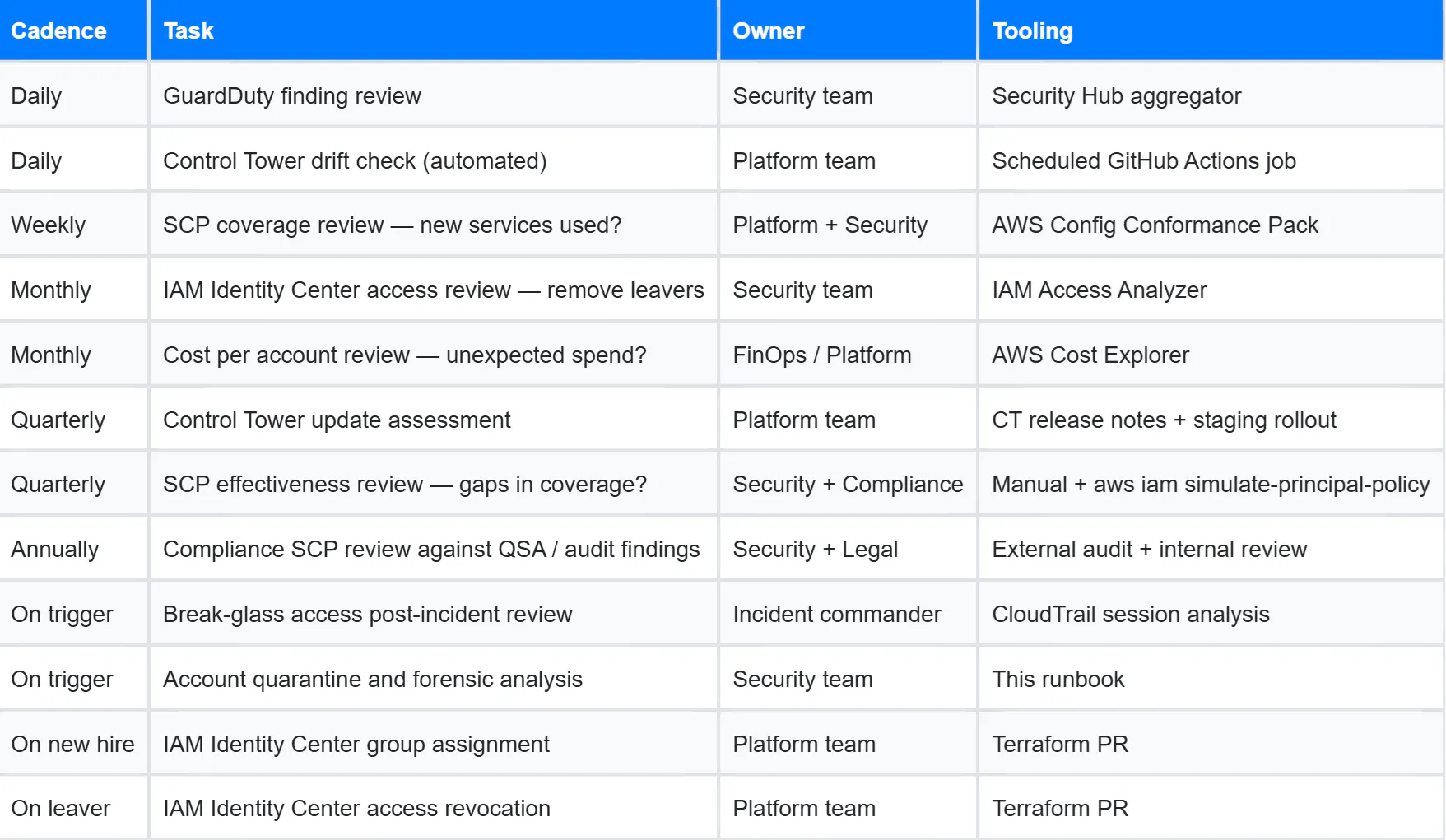
Day-2 operations are not a one-time activity. The following table summarises the recurring governance tasks that keep your Organization structure healthy over time.
Series Complete
This is the final article in the AWS Organizations: From Zero to Enterprise series. Starting from the case for multi-account AWS in Part 1, through the hands-on Terraform implementation of Control Tower, OUs, and foundational SCPs in Part 2, to the compliance SCP library, guardrail management, IAM Identity Center, and operational runbooks in this article.
The architecture described across all three parts has been deployed in production across financial services, healthcare, and SaaS organisations ranging from 20 to 50,000 employees. The SCPs, runbooks, and Terraform patterns are based on real production implementations — with account IDs, proprietary names, and company-specific details abstracted.
If there are topics from this series you want to see expanded into standalone deep-dives — Transit Gateway and network architecture, FinOps programs at the organisational level, migrating an existing single-account workload into a landing zone, or building a fully automated compliance reporting pipeline — leave them in the comments.