Contact Flows as Code: Terraform & CI/CD Pipeline for Amazon Connect
📞 Series: Amazon Connect at Scale — Part 2 of 5
✅ Part 1: Architecture & Capacity Planning
Part 2: Contact Flows as Code — Terraform & CI/CD (this article)
Part 3: Lambda Integration Patterns
Part 4: GDPR & HIPAA Compliance
Part 5: Troubleshooting & Observability
⏱ 28 min read · Advanced · Terraform · GitHub Actions · Amazon Connect
I want to start this article by describing something I have seen in almost every Amazon Connect deployment I have been called in to help with. There is a folder on someone's desktop called connect-flows-backup. Inside it are JSON files named things like MainFlow_FINAL_v3_USE_THIS_ONE.json and MainFlow_FINAL_v3_USE_THIS_ONE_ACTUALLY_FINAL.json. When I ask how a change gets deployed to production, the answer involves someone logging into the console, clicking through the flow editor, and saving. When I ask what happens if that change breaks something, the answer is a pause followed by "we... reopen the old JSON file and paste it back in?"
This is not a criticism of the people who built those systems. Amazon Connect's console flow editor is genuinely good — it is visual, it is fast to iterate in, and it makes contact flow logic tangible in a way that raw JSON does not. The problem is that it has no version history, no review process, no environment promotion, and no rollback capability beyond whatever you manually saved. At 10,000 concurrent calls, a bad change to your main inbound flow does not affect one customer. It affects all of them, simultaneously, right now.
This article builds the infrastructure that solves that problem completely.
By the end of this article you will have a complete Terraform-managed Connect deployment — both US and EU instances — behind a GitHub Actions CI/CD pipeline with environment promotion, plan review on pull requests, and a tested rollback procedure that takes under 60 seconds to execute.
1. Why the Console Breaks Down at Scale
Before building the solution, it is worth being specific about what actually breaks when you manage Connect flows through the console. The failure modes are predictable and they all occur at the worst possible moments.
No Audit Trail
CloudTrail records Connect API calls, but the call logged is UpdateContactFlow with a payload that shows the flow ID and the new JSON content. To understand what changed between the previous version and the current one, you need to diff two blobs of JSON that Connect generated. There is no "view history" in the console. If a HIPAA auditor asks "what changed in your main authentication flow between January and March?", the honest answer without version control is "we don't know precisely."
No Environment Promotion
In a compliant contact centre, you need a dev instance where developers can break things freely, a staging instance where changes are validated against real call scenarios, and a production instance that customers call. Without IaC, promoting a flow from dev to staging to prod means exporting JSON from the dev console and importing it into staging, then repeating for prod. Every manual step is an opportunity for the versions to diverge. I have seen production flows that had not received a change that was "deployed" to it three months earlier because the manual export step was skipped.
No Review Process
A contact flow that routes HIPAA-scoped callers to the wrong queue — one without the appropriate agent training or compliance controls — is not just a customer experience failure. It is potentially a regulatory incident. With console-based management, there is no pull request, no code review, no second set of eyes before a change goes live. The console will happily let you save a broken flow.
No Rollback
This is the one that people feel viscerally when it happens. A developer changes the authentication flow, introduces a logic error, and suddenly 10% of callers are being disconnected mid-authentication. With a proper pipeline, rollback is git revert followed by pushing the commit. Without it, rollback is "find the last known good JSON, open the flow editor, paste it in, click save" — under pressure, with callers actively failing.
2. Repository Structure — The Foundation
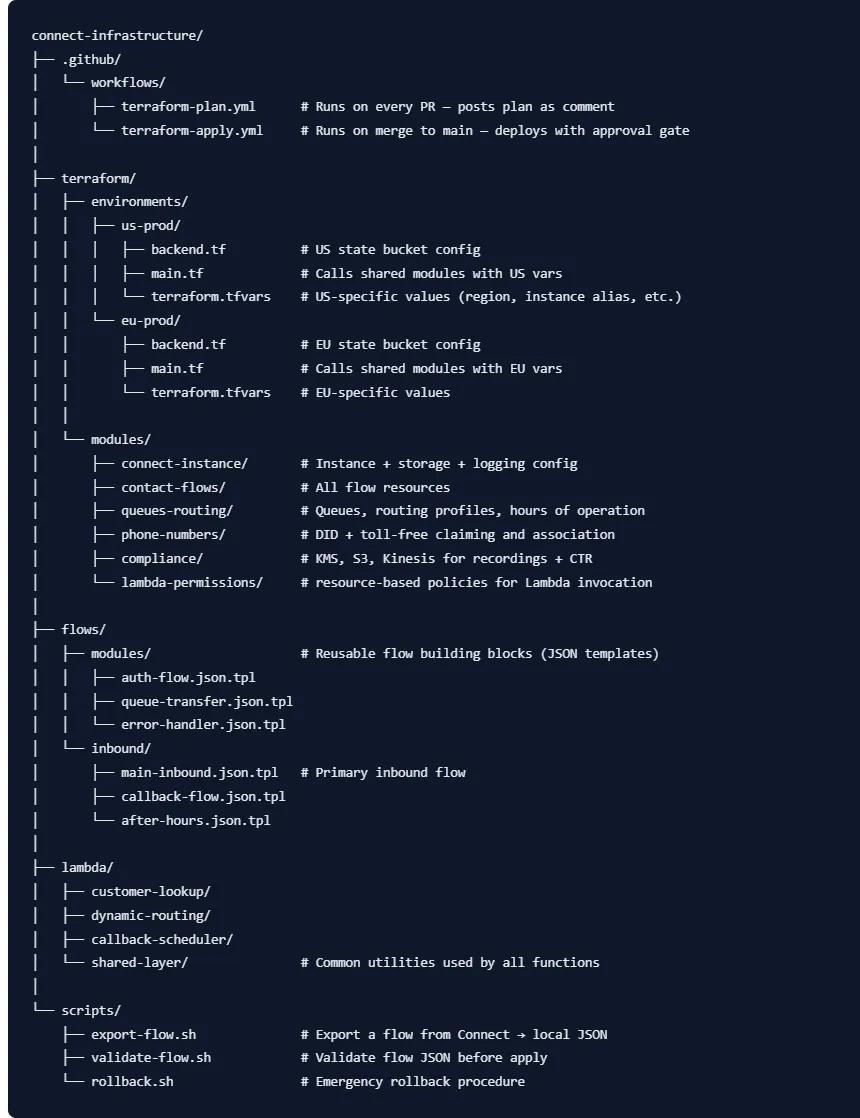
Everything starts with repository layout. A well-organised repository makes the difference between a pipeline that a new team member can understand in 20 minutes and one that requires tribal knowledge to operate. Here is the structure we use for the full 10,000 concurrent call deployment:
💡 One Repository, Two Environments
Both the US (HIPAA) and EU (GDPR) instances are managed from a single repository. The environments/ structure means each environment has its own Terraform state, its own variable values, and its own backend — but they both call the same modules. A change to the contact-flows module deploys to both instances when merged. Environment-specific overrides live in terraform.tfvars. This is the only approach that reliably prevents the two instances from drifting apart.
3. The Contact Flow JSON Problem — And How Terraform Solves It
Amazon Connect contact flows are stored internally as JSON documents. They look like this in their raw form — a graph of blocks with connections between them, each block having a type, parameters, and transitions:
{
  "Version": "2019-10-30",
  "StartAction": "12345678-1234-1234-1234-123456789012",
  "Actions": [
    {
      "Identifier": "12345678-1234-1234-1234-123456789012",
      "Type": "MessageParticipant",
      "Parameters": {
        "Text": "Thank you for calling. Please hold while we connect you."
      },
      "Transitions": {
        "NextAction": "87654321-4321-4321-4321-210987654321",
        "Errors": [],
        "Conditions": []
      }
    },
    {
      "Identifier": "87654321-4321-4321-4321-210987654321",
      "Type": "TransferToQueue",
      "Parameters": {
        "QueueId": { "ReferenceName": "QUEUE_SUPPORT_ARN" }
      },
      "Transitions": {
        "NextAction": "END",
        "Errors": [{ "NextAction": "END", "ErrorType": "QueueAtCapacity" }],
        "Conditions": []
      }
    }
  ]
}
The challenge is that queue IDs, Lambda function ARNs, Lex bot ARNs, and other resource references inside a flow are environment-specific. The queue ID in your dev instance is different from the queue ID in your production instance. If you export a flow from dev and import it directly into prod, those references break silently — the flow saves successfully but fails at runtime because it is pointing at resources that do not exist in the production instance.
The solution is Terraform's templatefile() function combined with JSON template files. The flow JSON uses placeholder variable names instead of hardcoded IDs, and Terraform substitutes the correct environment values at apply time:
##############################################################
# terraform/modules/contact-flows/main.tf
#
# Manages all contact flows for a Connect instance.
# Flow JSON files are templates — Terraform injects environment-
# specific ARNs and IDs at apply time, solving the ID mismatch
# problem that breaks manually-exported flows.
##############################################################

variable "instance_id"              { type = string }
variable "instance_arn"             { type = string }
variable "queue_arns"               { type = map(string) }
variable "lambda_arns"              { type = map(string) }
variable "lex_bot_arn"              { type = string }
variable "environment"              { type = string }

# ── Error Handler Flow (deployed first — other flows depend on it) ────────────
resource "aws_connect_contact_flow" "error_handler" {
  instance_id = var.instance_id
  name        = "error-handler"
  description = "Shared error handler — plays apology message and disconnects gracefully"
  type        = "CONTACT_FLOW"

  content = templatefile("${path.module}/../../../flows/modules/error-handler.json.tpl", {
    instance_arn = var.instance_arn
    environment  = var.environment
  })

  tags = { ManagedBy = "Terraform", Environment = var.environment }

  lifecycle {
    # Prevent accidental deletion of a flow that is referenced by active calls
    prevent_destroy = true
  }
}

# ── Authentication Flow Module ────────────────────────────────────────────────
resource "aws_connect_contact_flow_module" "auth" {
  instance_id = var.instance_id
  name        = "customer-authentication"
  description = "Reusable auth block — verifies caller via DOB + account number"

  # Flow modules use templatefile() just like regular flows
  content = templatefile("${path.module}/../../../flows/modules/auth-flow.json.tpl", {
    customer_lookup_lambda_arn = var.lambda_arns["customer-lookup"]
    environment                = var.environment
  })

  tags = { ManagedBy = "Terraform", Environment = var.environment }
}

# ── Main Inbound Flow ─────────────────────────────────────────────────────────
resource "aws_connect_contact_flow" "main_inbound" {
  instance_id = var.instance_id
  name        = "main-inbound"
  description = "Primary entry point for all inbound calls"
  type        = "CONTACT_FLOW"

  content = templatefile("${path.module}/../../../flows/inbound/main-inbound.json.tpl", {
    instance_arn               = var.instance_arn
    auth_flow_module_id        = aws_connect_contact_flow_module.auth.id
    error_handler_flow_id      = aws_connect_contact_flow.error_handler.id
    queue_platinum_arn         = var.queue_arns["platinum-support"]
    queue_standard_arn         = var.queue_arns["standard-support"]
    queue_callback_arn         = var.queue_arns["callback-queue"]
    queue_overflow_arn         = var.queue_arns["overflow"]
    dynamic_routing_lambda_arn = var.lambda_arns["dynamic-routing"]
    customer_lookup_lambda_arn = var.lambda_arns["customer-lookup"]
    lex_bot_arn                = var.lex_bot_arn
    environment                = var.environment
  })

  tags = { ManagedBy = "Terraform", Environment = var.environment }

  lifecycle { prevent_destroy = true }

  # Explicit dependency — error handler must exist before main flow
  depends_on = [aws_connect_contact_flow.error_handler]
}

# ── After-Hours Flow ──────────────────────────────────────────────────────────
resource "aws_connect_contact_flow" "after_hours" {
  instance_id = var.instance_id
  name        = "after-hours"
  description = "Plays after-hours message and offers callback"
  type        = "CONTACT_FLOW"

  content = templatefile("${path.module}/../../../flows/inbound/after-hours.json.tpl", {
    instance_arn           = var.instance_arn
    callback_flow_id       = aws_connect_contact_flow.callback.id
    error_handler_flow_id  = aws_connect_contact_flow.error_handler.id
    environment            = var.environment
  })

  tags = { ManagedBy = "Terraform", Environment = var.environment }
}

# ── Callback Flow ─────────────────────────────────────────────────────────────
resource "aws_connect_contact_flow" "callback" {
  instance_id = var.instance_id
  name        = "callback-flow"
  description = "Handles virtual queue callback requests"
  type        = "CONTACT_FLOW"

  content = templatefile("${path.module}/../../../flows/inbound/callback-flow.json.tpl", {
    instance_arn                  = var.instance_arn
    callback_scheduler_lambda_arn = var.lambda_arns["callback-scheduler"]
    queue_callback_arn            = var.queue_arns["callback-queue"]
    environment                   = var.environment
  })

  tags = { ManagedBy = "Terraform", Environment = var.environment }
}
A Real Flow Template — Main Inbound (Simplified)
Here is what the main-inbound.json.tpl template looks like. The ${variable_name} syntax is Terraform's template interpolation — these are replaced with actual values from the templatefile() call above:
{
  "Version": "2019-10-30",
  "StartAction": "play-welcome",
  "Actions": [
    {
      "Identifier": "play-welcome",
      "Type": "MessageParticipant",
      "Parameters": {
        "Text": "Thank you for calling. This call may be recorded for quality and compliance purposes."
      },
      "Transitions": { "NextAction": "invoke-customer-lookup" }
    },
    {
      "Identifier": "invoke-customer-lookup",
      "Type": "InvokeLambdaFunction",
      "Parameters": {
        "LambdaFunctionARN": "${customer_lookup_lambda_arn}",
        "InvocationTimeLimitSeconds": "8",
        "ResponseValidation": { "ResponseType": "STRING_MAP" }
      },
      "Transitions": {
        "NextAction": "check-customer-tier",
        "Errors": [
          { "NextAction": "transfer-to-standard", "ErrorType": "NoMatchingError" },
          { "NextAction": "transfer-to-standard", "ErrorType": "TimedOut" }
        ]
      }
    },
    {
      "Identifier": "check-customer-tier",
      "Type": "CheckAttribute",
      "Parameters": {
        "Attribute": "customerTier",
        "ToCheck": [
          { "Value": "platinum", "Operator": "Equals" }
        ]
      },
      "Transitions": {
        "Conditions": [
          { "NextAction": "transfer-to-platinum", "Condition": { "Operator": "Equals", "Operand": "platinum" } }
        ],
        "NextAction": "transfer-to-standard"
      }
    },
    {
      "Identifier": "transfer-to-platinum",
      "Type": "TransferToQueue",
      "Parameters": {
        "QueueId": "${queue_platinum_arn}"
      },
      "Transitions": {
        "NextAction": "END",
        "Errors": [
          { "NextAction": "transfer-to-overflow", "ErrorType": "QueueAtCapacity" },
          { "NextAction": "${error_handler_flow_id}", "ErrorType": "NoMatchingError" }
        ]
      }
    },
    {
      "Identifier": "transfer-to-standard",
      "Type": "TransferToQueue",
      "Parameters": { "QueueId": "${queue_standard_arn}" },
      "Transitions": {
        "NextAction": "END",
        "Errors": [
          { "NextAction": "transfer-to-overflow", "ErrorType": "QueueAtCapacity" }
        ]
      }
    },
    {
      "Identifier": "transfer-to-overflow",
      "Type": "TransferToQueue",
      "Parameters": { "QueueId": "${queue_overflow_arn}" },
      "Transitions": { "NextAction": "END" }
    }
  ]
}
📋 Template Identifiers Must Be UUIDs in Production
The identifiers like "play-welcome" and "invoke-customer-lookup" used above are readable strings for illustration. In a real Connect flow, these must be valid UUIDs (e.g. a1b2c3d4-1234-1234-1234-123456789012). When you first build a flow in the console and export it, Connect generates these UUIDs for you. Copy them into your template file — do not regenerate them, because changing an identifier breaks any other flow that references that block.
4. Environment Configuration — Dev, Staging, Production
Each environment has its own Terraform workspace and its own Connect instance. Here is how the environment-specific configuration works for the US production instance:
##############################################################
# terraform/environments/us-prod/main.tf
##############################################################

module "connect_instance" {
  source = "../../modules/connect-instance"

  providers = { aws = aws.us_east_1 }

  instance_alias           = "${var.company_slug}-us-prod"
  identity_management_type = "CONNECT_MANAGED"
  environment              = "production"
  compliance               = "HIPAA"
}

module "compliance" {
  source = "../../modules/compliance"

  providers = { aws = aws.us_east_1 }

  instance_id      = module.connect_instance.instance_id
  environment      = "production"
  region           = "us-east-1"
  compliance_type  = "HIPAA"
  retention_days   = 2555   # 7 years — HIPAA minimum
  enable_object_lock = true
}

module "queues_routing" {
  source = "../../modules/queues-routing"

  providers = { aws = aws.us_east_1 }

  instance_id = module.connect_instance.instance_id
  environment = "production"

  queues = {
    "platinum-support" = { max_contacts = 100,  hours = "247" }
    "standard-support" = { max_contacts = 500,  hours = "business" }
    "callback-queue"   = { max_contacts = 1000, hours = "247" }
    "overflow"         = { max_contacts = 5000, hours = "247" }
  }
}

module "contact_flows" {
  source = "../../modules/contact-flows"

  providers = { aws = aws.us_east_1 }

  instance_id  = module.connect_instance.instance_id
  instance_arn = module.connect_instance.instance_arn
  environment  = "production"

  queue_arns  = module.queues_routing.queue_arns
  lambda_arns = module.lambda_permissions.lambda_arns
  lex_bot_arn = var.lex_bot_arn_us
}

##############################################################
# terraform/environments/us-prod/terraform.tfvars
##############################################################

# company_slug  = "acme"
# lex_bot_arn_us = "arn:aws:lex:us-east-1:123456789:bot/SupportBot/..."

##############################################################
# terraform/environments/us-prod/backend.tf
##############################################################

terraform {
  backend "s3" {
    bucket         = "acme-tfstate-us-east-1"
    key            = "connect/us-prod/terraform.tfstate"
    region         = "us-east-1"
    encrypt        = true
    dynamodb_table = "terraform-lock"
    role_arn       = "arn:aws:iam::MGMT-ACCOUNT-ID:role/TerraformConnectRole"
  }
}
5. GitHub Actions CI/CD Pipeline — Full Implementation
The pipeline has two workflows. The plan workflow runs on every pull request and posts the Terraform plan as a PR comment so reviewers can see exactly what will change before approving. The apply workflow runs on merge to main, requires manual approval through GitHub's environment protection rules, and deploys to both instances sequentially.
Workflow 1 — Terraform Plan on Pull Request
##############################################################
# .github/workflows/terraform-plan.yml
# Runs on every PR targeting main
# Posts plan output as a PR comment — reviewers see exact changes
##############################################################
name: Terraform Plan

on:
  pull_request:
    branches: [main]
    paths:
      - 'terraform/**'
      - 'flows/**'
      - '.github/workflows/**'

permissions:
  id-token: write
  contents: read
  pull-requests: write

jobs:
  validate:
    name: Validate Flows
    runs-on: ubuntu-latest
    steps:
      - uses: actions/checkout@v4

      - name: Validate flow JSON templates
        run: |
          # Check all flow templates are valid JSON when variables are stubbed
          for template in flows/**/*.json.tpl; do
            echo "Validating: $template"
            # Replace template variables with stub values for syntax check
            sed 's/\${[^}]*}/stub-value/g' "$template" | python3 -m json.tool > /dev/null
            echo "  ✅ $template"
          done

  plan-us:
    name: Plan — US (HIPAA)
    runs-on: ubuntu-latest
    needs: validate
    environment: plan   # Read-only role — cannot apply

    steps:
      - uses: actions/checkout@v4

      - name: Configure AWS credentials (OIDC)
        uses: aws-actions/configure-aws-credentials@v4
        with:
          role-to-assume: ${{ secrets.AWS_PLAN_ROLE_ARN }}
          aws-region: us-east-1

      - uses: hashicorp/setup-terraform@v3
        with:
          terraform_version: '~1.7'
          terraform_wrapper: true

      - name: Terraform Init (US)
        run: terraform init -input=false
        working-directory: terraform/environments/us-prod

      - name: Terraform Plan (US)
        id: plan_us
        run: terraform plan -no-color -input=false -out=tfplan-us
        working-directory: terraform/environments/us-prod
        continue-on-error: true
        env:
          TF_VAR_company_slug: ${{ vars.COMPANY_SLUG }}
          TF_VAR_lex_bot_arn_us: ${{ secrets.LEX_BOT_ARN_US }}

      - name: Post Plan to PR
        uses: actions/github-script@v7
        with:
          script: |
            const plan = `${{ steps.plan_us.outputs.stdout }}`;
            const status = '${{ steps.plan_us.outcome }}' === 'success' ? '✅' : '❌';
            const body = [
              `### Terraform Plan — US (HIPAA) ${status}`,
              `Show full plan`,
              ``,
              `*@${{ github.actor }} · ${{ github.sha }}*`
            ].join('\n');

            // Update existing comment rather than create a new one each push
            const { data: comments } = await github.rest.issues.listComments({
              owner: context.repo.owner, repo: context.repo.repo,
              issue_number: context.issue.number
            });
            const existing = comments.find(c =>
              c.user.type === 'Bot' && c.body.includes('Terraform Plan — US')
            );
            if (existing) {
              await github.rest.issues.updateComment({
                owner: context.repo.owner, repo: context.repo.repo,
                comment_id: existing.id, body
              });
            } else {
              await github.rest.issues.createComment({
                owner: context.repo.owner, repo: context.repo.repo,
                issue_number: context.issue.number, body
              });
            }

      - name: Upload plan artifact
        if: steps.plan_us.outcome == 'success'
        uses: actions/upload-artifact@v4
        with:
          name: tfplan-us
          path: terraform/environments/us-prod/tfplan-us
          retention-days: 3

      - name: Fail if plan failed
        if: steps.plan_us.outcome == 'failure'
        run: exit 1

  plan-eu:
    name: Plan — EU (GDPR)
    runs-on: ubuntu-latest
    needs: validate
    # Mirror of plan-us for EU instance — identical structure with eu-prod paths
    steps:
      - uses: actions/checkout@v4
      - uses: aws-actions/configure-aws-credentials@v4
        with:
          role-to-assume: ${{ secrets.AWS_PLAN_ROLE_ARN }}
          aws-region: eu-west-1
      - uses: hashicorp/setup-terraform@v3
        with: { terraform_version: '~1.7', terraform_wrapper: true }
      - name: Terraform Init (EU)
        run: terraform init -input=false
        working-directory: terraform/environments/eu-prod
      - name: Terraform Plan (EU)
        id: plan_eu
        run: terraform plan -no-color -input=false -out=tfplan-eu
        working-directory: terraform/environments/eu-prod
        continue-on-error: true
        env:
          TF_VAR_company_slug: ${{ vars.COMPANY_SLUG }}
          TF_VAR_lex_bot_arn_eu: ${{ secrets.LEX_BOT_ARN_EU }}
      - name: Upload EU plan artifact
        if: steps.plan_eu.outcome == 'success'
        uses: actions/upload-artifact@v4
        with:
          name: tfplan-eu
          path: terraform/environments/eu-prod/tfplan-eu
          retention-days: 3
Workflow 2 — Apply on Merge to Main
##############################################################
# .github/workflows/terraform-apply.yml
# Runs on merge to main — requires manual approval before apply
# Downloads the EXACT plan artifact created during PR review
##############################################################
name: Terraform Apply

on:
  push:
    branches: [main]
    paths:
      - 'terraform/**'
      - 'flows/**'

permissions:
  id-token: write
  contents: read

jobs:
  apply-us:
    name: Apply — US (HIPAA)
    runs-on: ubuntu-latest
    environment: production-us   # GitHub env with required reviewers configured

    steps:
      - uses: actions/checkout@v4

      - name: Configure AWS credentials (OIDC — apply role)
        uses: aws-actions/configure-aws-credentials@v4
        with:
          role-to-assume: ${{ secrets.AWS_APPLY_ROLE_ARN }}
          aws-region: us-east-1

      - uses: hashicorp/setup-terraform@v3
        with: { terraform_version: '~1.7', terraform_wrapper: false }

      # Download the SAME plan that was reviewed on the PR
      # This guarantees apply executes exactly what was approved
      - name: Download plan artifact
        uses: actions/download-artifact@v4
        with:
          name: tfplan-us
          path: terraform/environments/us-prod/

      - name: Terraform Init
        run: terraform init -input=false
        working-directory: terraform/environments/us-prod

      - name: Terraform Apply
        run: terraform apply -no-color -input=false tfplan-us
        working-directory: terraform/environments/us-prod

      - name: Capture current flow versions for rollback
        run: |
          # Export current flow IDs and content hashes — used by rollback script
          aws connect list-contact-flows \
            --instance-id $(terraform output -raw instance_id) \
            --query 'ContactFlowSummaryList[*].{Id:Id,Name:Name,Arn:Arn}' \
            --output json > /tmp/flow-snapshot-us.json

          # Store snapshot in S3 for rollback reference
          aws s3 cp /tmp/flow-snapshot-us.json \
            s3://${{ vars.TFSTATE_BUCKET }}/flow-snapshots/us/$(date +%Y%m%d-%H%M%S).json
        working-directory: terraform/environments/us-prod

      - name: Apply Summary
        if: always()
        run: |
          echo "### Connect US Deploy ${{ job.status == 'success' && '✅' || '❌' }}" >> $GITHUB_STEP_SUMMARY
          echo "| | |" >> $GITHUB_STEP_SUMMARY
          echo "|---|---|" >> $GITHUB_STEP_SUMMARY
          echo "| Environment | US Production (HIPAA) |" >> $GITHUB_STEP_SUMMARY
          echo "| Status | ${{ job.status }} |" >> $GITHUB_STEP_SUMMARY
          echo "| Commit | ${{ github.sha }} |" >> $GITHUB_STEP_SUMMARY
          echo "| Time | $(date -u) |" >> $GITHUB_STEP_SUMMARY

  apply-eu:
    name: Apply — EU (GDPR)
    runs-on: ubuntu-latest
    needs: apply-us         # EU deploys only after US succeeds
    environment: production-eu

    steps:
      - uses: actions/checkout@v4
      - uses: aws-actions/configure-aws-credentials@v4
        with:
          role-to-assume: ${{ secrets.AWS_APPLY_ROLE_ARN_EU }}
          aws-region: eu-west-1
      - uses: hashicorp/setup-terraform@v3
        with: { terraform_version: '~1.7', terraform_wrapper: false }
      - uses: actions/download-artifact@v4
        with:
          name: tfplan-eu
          path: terraform/environments/eu-prod/
      - name: Terraform Init
        run: terraform init -input=false
        working-directory: terraform/environments/eu-prod
      - name: Terraform Apply
        run: terraform apply -no-color -input=false tfplan-eu
        working-directory: terraform/environments/eu-prod
💡 EU Deploys After US — Intentional
The needs: apply-us dependency on the EU job is deliberate. If a flow change causes a problem, you want to catch it on the US instance first — where your monitoring is most mature and your on-call team is most likely awake — before it propagates to EU. This gives you a natural canary stage without running a separate canary instance.
6. The 60-Second Rollback Procedure
Every production team needs to know exactly how to undo a bad deployment before it happens. Practise this procedure before you go live, not after something breaks. The goal is that any engineer on the on-call rotation can execute it under pressure without needing to think.
#!/usr/bin/env bash
##############################################################
# scripts/rollback.sh
# Roll back a specific contact flow to its previous version
#
# Usage: ./rollback.sh [us|eu]
# Example: ./rollback.sh us main-inbound
#
# This script does NOT touch Terraform state. It directly
# updates the flow content in Connect using the AWS CLI.
# After the rollback, you still need to fix the Terraform
# code and apply a proper fix through the pipeline.
##############################################################

set -euo pipefail

REGION_TARGET="${1:?Usage: ./rollback.sh [us|eu] }"
FLOW_NAME="${2:?Provide flow name, e.g. main-inbound}"
TIMESTAMP=$(date -u +"%Y-%m-%dT%H:%M:%SZ")

# Resolve region and instance ID from SSM
if [ "$REGION_TARGET" = "us" ]; then
  REGION="us-east-1"
  INSTANCE_ID=$(aws ssm get-parameter --name "/connect/us/instance-id" \
    --region "$REGION" --query 'Parameter.Value' --output text)
elif [ "$REGION_TARGET" = "eu" ]; then
  REGION="eu-west-1"
  INSTANCE_ID=$(aws ssm get-parameter --name "/connect/eu/instance-id" \
    --region "$REGION" --query 'Parameter.Value' --output text)
else
  echo "ERROR: Region must be 'us' or 'eu'"
  exit 1
fi

echo "============================================"
echo "  CONNECT FLOW ROLLBACK"
echo "============================================"
echo "  Region   : $REGION"
echo "  Instance : $INSTANCE_ID"
echo "  Flow     : $FLOW_NAME"
echo "  Time     : $TIMESTAMP"
echo "============================================"

# Step 1: Find the flow ID by name
FLOW_ID=$(aws connect list-contact-flows \
  --instance-id "$INSTANCE_ID" \
  --region "$REGION" \
  --query "ContactFlowSummaryList[?Name=='$FLOW_NAME'].Id | [0]" \
  --output text)

if [ "$FLOW_ID" = "None" ] || [ -z "$FLOW_ID" ]; then
  echo "ERROR: Flow '$FLOW_NAME' not found in instance $INSTANCE_ID"
  exit 1
fi

echo "Found flow: $FLOW_ID"

# Step 2: Fetch the last known good version from Git
# The Terraform-managed flow content lives in the flows/ directory.
# git show gives us the committed version — one commit before HEAD.
echo "Fetching previous version from Git..."
PREV_COMMIT=$(git log --oneline -2 -- "flows/**/${FLOW_NAME}.json.tpl" | tail -1 | awk '{print $1}')

if [ -z "$PREV_COMMIT" ]; then
  echo "ERROR: Cannot find previous commit for $FLOW_NAME"
  echo "Manual recovery needed — check flow snapshots in S3"
  exit 1
fi

echo "Rolling back to commit: $PREV_COMMIT"

# Step 3: Generate the flow content with stub variables (for emergency use)
# In production, you would retrieve the actual ARNs from SSM
QUEUE_PLATINUM=$(aws ssm get-parameter --name "/connect/${REGION_TARGET}/queues/platinum-support/arn" \
  --region "$REGION" --query 'Parameter.Value' --output text)
QUEUE_STANDARD=$(aws ssm get-parameter --name "/connect/${REGION_TARGET}/queues/standard-support/arn" \
  --region "$REGION" --query 'Parameter.Value' --output text)
CUSTOMER_LOOKUP_ARN=$(aws ssm get-parameter --name "/connect/${REGION_TARGET}/lambda/customer-lookup/arn" \
  --region "$REGION" --query 'Parameter.Value' --output text)

# Export the template from the previous commit and substitute variables
FLOW_CONTENT=$(git show "${PREV_COMMIT}:flows/inbound/${FLOW_NAME}.json.tpl" | \
  sed "s|\${queue_platinum_arn}|${QUEUE_PLATINUM}|g" | \
  sed "s|\${queue_standard_arn}|${QUEUE_STANDARD}|g" | \
  sed "s|\${customer_lookup_lambda_arn}|${CUSTOMER_LOOKUP_ARN}|g")

# Step 4: Update the flow content directly via AWS CLI
echo "Applying rollback..."
aws connect update-contact-flow-content \
  --instance-id "$INSTANCE_ID" \
  --contact-flow-id "$FLOW_ID" \
  --content "$FLOW_CONTENT" \
  --region "$REGION"

echo ""
echo "✅ Rollback complete"
echo "   Flow '$FLOW_NAME' has been rolled back to commit $PREV_COMMIT"
echo ""
echo "IMPORTANT — Next steps:"
echo "  1. Verify call routing is working correctly"
echo "  2. Create a Git revert: git revert HEAD -- flows/inbound/${FLOW_NAME}.json.tpl"
echo "  3. Open a PR with the revert and merge through the normal pipeline"
echo "  4. The Terraform state will re-sync on next apply"
echo "  5. Document the incident and root cause"
7. Secrets Management — No Hardcoded ARNs in Flow Templates
Contact flows reference Lambda function ARNs, Lex bot ARNs, queue ARNs, and prompt ARNs. These values are environment-specific and must never be hardcoded in flow templates. The correct pattern stores all these references in SSM Parameter Store, where Terraform reads them at apply time and injects them into flow templates via templatefile().
##############################################################
# terraform/modules/contact-flows/ssm-outputs.tf
#
# After deploying flows, write all resource ARNs to SSM.
# Lambda functions read these at runtime to find their
# sibling functions. The rollback script reads these to
# substitute template variables during emergency recovery.
##############################################################

# Write queue ARNs to SSM — referenced by Lambda routing functions
resource "aws_ssm_parameter" "queue_arns" {
  for_each = var.queue_arns

  name  = "/connect/${var.environment}/queues/${each.key}/arn"
  type  = "String"
  value = each.value
  tags  = { ManagedBy = "Terraform" }
}

# Write flow IDs to SSM — referenced by other flows for transfer actions
resource "aws_ssm_parameter" "flow_ids" {
  for_each = {
    "main-inbound"  = aws_connect_contact_flow.main_inbound.id
    "after-hours"   = aws_connect_contact_flow.after_hours.id
    "callback"      = aws_connect_contact_flow.callback.id
    "error-handler" = aws_connect_contact_flow.error_handler.id
  }

  name  = "/connect/${var.environment}/flows/${each.key}/id"
  type  = "String"
  value = each.value
  tags  = { ManagedBy = "Terraform" }
}

# Write Lambda ARNs — rollback script and monitoring use these
resource "aws_ssm_parameter" "lambda_arns" {
  for_each = var.lambda_arns

  name  = "/connect/${var.environment}/lambda/${each.key}/arn"
  type  = "String"
  value = each.value
  tags  = { ManagedBy = "Terraform" }
}
8. Flow Export — Bridging Console Edits and Terraform
Reality check: your developers will sometimes prototype flows in the Connect console before codifying them in Terraform. That is fine — the console's visual editor is genuinely the right tool for figuring out a flow's logic. What is not fine is leaving those console edits as the production source of truth. This script exports a flow from Connect, cleans it up, and creates a Terraform-ready template:
#!/usr/bin/env bash
##############################################################
# scripts/export-flow.sh
# Export a flow from Connect → local JSON template
#
# Usage: ./export-flow.sh [us|eu]
# Example: ./export-flow.sh us "main-inbound" flows/inbound/main-inbound.json.tpl
##############################################################

set -euo pipefail

REGION_TARGET="${1:?Region required: us or eu}"
FLOW_NAME="${2:?Flow name required}"
OUTPUT_PATH="${3:?Output file path required}"

[ "$REGION_TARGET" = "us" ] && REGION="us-east-1" || REGION="eu-west-1"

INSTANCE_ID=$(aws ssm get-parameter \
  --name "/connect/${REGION_TARGET}/instance-id" \
  --region "$REGION" --query 'Parameter.Value' --output text)

# Find the flow
FLOW_ID=$(aws connect list-contact-flows \
  --instance-id "$INSTANCE_ID" \
  --region "$REGION" \
  --query "ContactFlowSummaryList[?Name=='$FLOW_NAME'].Id | [0]" \
  --output text)

echo "Exporting flow: $FLOW_NAME ($FLOW_ID)"

# Export and pretty-print the JSON
aws connect describe-contact-flow \
  --instance-id "$INSTANCE_ID" \
  --contact-flow-id "$FLOW_ID" \
  --region "$REGION" \
  --query 'ContactFlow.Content' \
  --output text | python3 -m json.tool > /tmp/raw-flow.json

# Replace environment-specific ARNs with template variables
# This is what turns an exported flow into a reusable template
QUEUE_PLATINUM=$(aws ssm get-parameter --name "/connect/${REGION_TARGET}/queues/platinum-support/arn" \
  --region "$REGION" --query 'Parameter.Value' --output text)
QUEUE_STANDARD=$(aws ssm get-parameter --name "/connect/${REGION_TARGET}/queues/standard-support/arn" \
  --region "$REGION" --query 'Parameter.Value' --output text)
CUSTOMER_LOOKUP_ARN=$(aws ssm get-parameter --name "/connect/${REGION_TARGET}/lambda/customer-lookup/arn" \
  --region "$REGION" --query 'Parameter.Value' --output text)

sed \
  -e "s|$QUEUE_PLATINUM|\${queue_platinum_arn}|g" \
  -e "s|$QUEUE_STANDARD|\${queue_standard_arn}|g" \
  -e "s|$CUSTOMER_LOOKUP_ARN|\${customer_lookup_lambda_arn}|g" \
  /tmp/raw-flow.json > "$OUTPUT_PATH"

echo "✅ Exported to: $OUTPUT_PATH"
echo ""
echo "NEXT STEPS:"
echo "  1. Review the template and verify all ARNs were replaced"
echo "  2. Add any missing variable substitutions manually"
echo "  3. Test by running: terraform plan (should show no changes)"
echo "  4. Commit and push through the normal PR process"
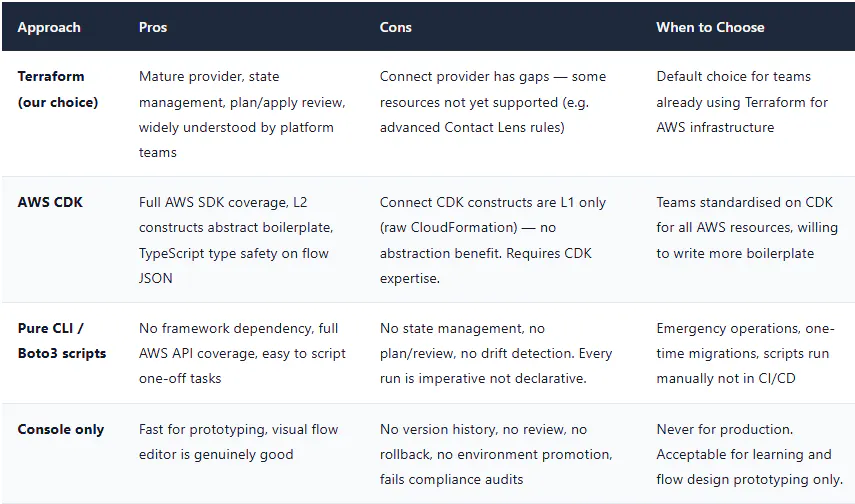
9. Trade-offs — Terraform vs CDK vs CLI Scripts
What's Next
Part 2 has given you the complete IaC and CI/CD foundation for the Connect deployment. Both instances are managed as code, deployed through a pipeline with review and approval gates, and backed by a tested rollback procedure. Every flow change from here on is a pull request, a plan review, and an apply — not a console click.
Part 3 moves inside the contact flows to build the Lambda integration layer. Five production patterns covering customer lookup, dynamic routing, real-time data injection, callback scheduling, and post-call processing — with the cold start reality check, the timeout handling that prevents callers from hearing dead air, and the IAM configuration that keeps Lambda invocations least-privilege.
📞 Amazon Connect at Scale
✅ Part 1: Architecture & Capacity Planning
✅ Part 2: Contact Flows as Code — Terraform & CI/CD (you are here)
➡️ Part 3: Lambda Integration Patterns
➡️ Part 4: GDPR & HIPAA Compliance
➡️ Part 5: Troubleshooting & Observability